Tag Archives: augmented reality

VR + AR Tabs December 2024

Catching up on what has happened in VR/AR since the summer:

  • v68
    • Meta Quest mobile app renamed as Meta Horizon app
    • Light mode added to Horizon mobile app
    • ability to start or join audio calls between the mobile app and Meta Quest headsets
    • Integration of Meta AI with Vision on Quest 3 and Meta AI audio-only on Quest 2 (experimental); replaces older on-device voice assistant (set for August 2024 release)
    • reduced performance latency on Quest 3
    • support for Content Adaptive Brightness Control in Quest 3 (experimental)
    • account management and communication updates in Safety Center
    • updates for the virtual keyboard
    • new Layout app for aligning and measuring real-world objects in physical space
    • new Download and All tabs in Library
    • management of cloud backups
    • ability to pair controller to headset while in-headset
    • audio alert for low battery
    • ability control the audio level balance between microphone and game audio when recording, live streaming, or casting
    • increased screenshot resolution in Quest 3 from 1440×1440 to 2160×2160
  • v69
    • “Hey Meta” wake word for Meta AI
    • v67 New Window Layout moved to default
    • spatial audio from windows
    • ability to completely remove unwanted apps and worlds, including leftover apps already uninstalled
    • quick pairing of Bluetooth peripherals when they are in pairing mode and near the headset
    • ability to keep the universal menu and up to three windows open during immersive experiences
    • Content-adaptive backlight control
    • automatic placing of user into a stationary boundary when user visits Horizon Home
    • Head tracked cursor interaction improvements for staying hidden when not wanted
    • ability to view the last 7 days of sensitive permission access by installed apps
    • Unified control of privacy across Meta Quest and Horizon Worlds
    • Control visibility and status from the social tab
    • support for tracked styluses
    • Oceanarium environment for Horizon Home
    • v69 required to support Horizon Worlds, Horizon Workrooms, co-presence and other Meta Horizon social experiences
  • v71 (v70 skipped by Meta)
    • redesign of Dark and Light Themes
    • redesign of control bar location
    • redesign of Settings menu
    • Travel Mode extended to trains
    • Link feature enabled by default
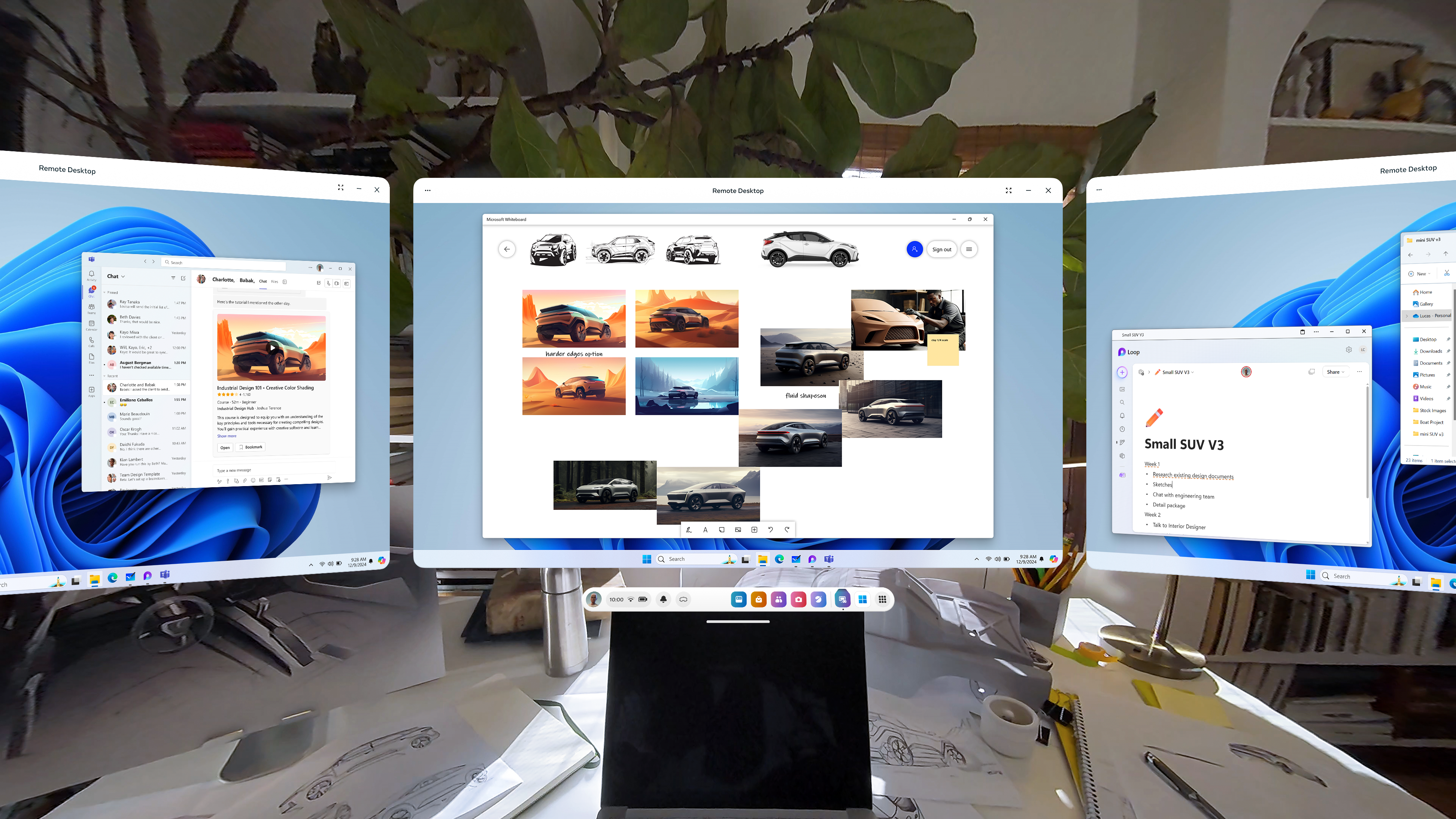
    • Remote Desktop in Quick Settings
    • ability to use desktop remotely through the Meta Quest Link app on PC
    • in-headset pairing of third-party styluses
    • in-headset controller pairing
    • view app permissions while in use
    • higher-quality casting from headset to PC
    • new Calendar app, with Google and Outlook Calendars integration, support for subscribed Meta Horizon Worlds events or Workrooms meetings
    • ability to share and play back spatial video within Horizon Chat in-headset and mobile
    • Volume Mixer, with separate Call Volume and App & Media Volume
    • support for content utilizing 3 degrees of freedom (DoF) head tracking through Dolby Atmos and Dolby Digital Surround
    • Audio to Expression: machine perception and AI capability deriving facial motion and lip sync signals from microphone input, providing upper face movements including upper cheeks, eyelids, and eyebrows for avatars
    • improvements for Passthrough and Space Setup
  • v72 [link]
    • live captions
    • system-wide virtual selfie cam
    • app folder for PC VR apps
    • launch 2D apps in the room: dragging and dropping the icon into your space
    • refreshed boot screen branding (officially “Meta Horizon OS”)
    • passthrough keyboard cutout with soft gradient when touching physical keyboard
    • dedicated Photo Gallery app
    • smart storage
    • one more slot for pinned apps

Meta Orion

  • Demo of Meta Orion AR glasses at Meta Connect and to tech journalists/vloggers
  • I’m especially interested in the neural wristbands. Definitely the biggest step forward by far.
  • Unfortunate that this will remain testware for the foreseeable future

Xreal One and One Pro

  • Launched early December
  • Basically the XReal Air 2 and Air 2 Pro with an embedded co-processor to enable a 3dof spatial UI
  • Still needs to be connected to a phone
  • Still a pair of movie glasses to be used in stationary settings
  • Still no news on the XReal Air 2 Ultra since it was released to developers in the spring

Other items

  • Release of Meta Quest 3S, replacing 128GB Quest 3
  • Discontinuation of Quest 2 and Quest Pro
  • Merger of separate apps for official Quest casting, PC VR, and remote desktop into Meta Quest Link

Takeaway

These last few updates, including what is currently seen in the v72 PTC, have really capped off a significant improvement in what the Quest 3 can do since its initial release in September 2023. Mixed reality on the device has become less of a gimmick. I’m surprised that I can’t find a anniversary review of the Quest 3 comparing the updates between September 2023 and December 2024. Biggest updates:

  • Passthrough
    • V60: passthrough while loading app (if enabled)
    • V64: resolution and image quality
    • V65: passthrough environment for some system menus and prompts, including lockscreen and power-off menu
    • V66: improvements to passthrough, including reductions in warping
    • V67: ability to take any window fullscreen, thus replacing other windows and replacing the dock with simplified control bar with buttons for toggling curving, passthrough background, and brightness of background
    • V71: improvements for Passthrough and Space Setup
    • V72: generalized passthrough cutout access for physical keyboards
  • Boundary and space setup
    • V59: suggested boundary and assisted space setup (for Quest 3)
    • V60: cloud computing capabilities to store boundaries, requiring opt-in to share point cloud data
    • V62: support for up to 15 total saved spaces in Space Setup
    • V64: automatic detection and labeling of objects within mesh during Space Setup (undocumented, experimental, optional)
    • V65: Local multiplayer and boundary recall with Meta Virtual Positioning System
    • V66: Space Setup automatic identification and marking of furniture (windows, doors, tables, couches, storage, screens, and beds, with additional furniture types supported over time) (documented, optional)
    • V69: automatic placing of user into a stationary boundary when user visits Horizon Home
    • V71: improvements for Passthrough and Space Setup
    • V72: automatic stationary boundary when booting into VR home
  • Avatars and hands
    • V59: legs for avatars in Horizon Home
    • V64: simultaneous tracking of hands and Touch Pro/Touch Plus controllers in the same space (undocumented, experimental, optional)
    • V65: fewer interruptions from hand tracking when using a physical keyboard or mouse with headset
    • V68: ability to pair controller to headset while in-headset
    • V71:
      • Audio to Expression: machine perception and AI capability deriving facial motion and lip sync signals from microphone input, providing upper face movements including upper cheeks, eyelids, and eyebrows for avatars. Replaces OVRLipsync SDK.
      • in-headset pairing of third-party styluses
      • in-headset controller pairing
    • V72: hand-tracking updates: stabilization and visual fixes for cursor; responsiveness and stability of drag-and-drop interactions

VR/AR News + Fun Links

Progress on Quest/Horizon OS

Since I last wrote on Meta Quest OS (v64 in April), lots of improvements have happened. Per the changelog:

  • v65
    • upload panoramic photos or spatial video to headset via Quest mobile app (supports IOS 17 or later)
    • passthrough environment
    • fewer interruptions from hand tracking when using a physical keyboard or mouse with headset
    • Local multiplayer and boundary recall with Meta Virtual Positioning System
    • Travel Mode for airplane flights (experimental, optional, available only for Quest 2 and 3)
  • v66
    • improvements to passthrough, including [significant] reductions in warping
    • adjustments to exposure, colors, and contrast
    • improvements to background audio for 2D apps, including minimizing apps without automatically pausing playback
    • media controller moved out of notifications into a Media Control Bar under the universal menu to control media playback
    • wrist buttons for clicking Meta and Menu icons (experimental)
    • ability to hide any app (installed or uninstalled) downloaded from the Quest Store
    • teens and children ages 10-12 who are supervised by the same parent or guardian are automatically able to see each other in the Family Center (starting June 27)
    • Sleep Mode added to power-off menu
    • Space Setup automatic identification and marking of furniture (windows, doors, tables, couches, storage, screens, and beds, with additional furniture types supported over time) (documented, optional)
  • v67
    • New Window Layout (experimental):
      • expanded maximum number of open windows from three to six in window layout (up to three docked and three attached)
      • ability to grab and detach windows to position and resize them freely
      • button to temporarily hide other windows in immersive view
      • ability to take any window fullscreen, thus replacing other windows and replacing the dock with simplified control bar with buttons for toggling curving, passthrough background, and brightness of background.
      • replaces explicit Close View and Far View modes
    • new creator videos in Horizon Feed
    • ability to use swipe typing to enter text when using headset
    • improvements to eye tracking recalibration (Quest Pro only)
    • select different durations for Do Not Disturb
    • Wi-Fi QR code scanner (Quest 3 only)
    • open Quest TV or use File Viewer to watch immersive videos without quitting current immersive app
    • developers allowed to swap out Boundary for Passthrough in their apps

Also, the verdicts on the most available VR/AR glasses:

  • Mobile XR glasses
    • Brilliant Frame has major issues with functionality
    • Meta Ray-Bans are top notch
    • TCL Ray Neos do most of what is advertised but has potential for more
  • Stationary XR glasses
    • Rokid is meh
    • Xreal Beam Pro is an improvement upon Xreal Beam, expands capabilities of the Xreal Air 2 Pro
    • Viture Pro holds up to Xreal Air 2 Pros, decent for gaming (especially with Viture Neckband)

Videos

Neurodiverse Friends: Schizophrenia SKIT

I’m now a fan of this animator’s output. Their series on Neurodiverse Friends uses animated cats to accurately describe expressions of conditions on the spectrum.

Queen Coke Francis: Ranking Mr. Birchum Yaoi

Context: Mr. Birchum is an unfortunate adult animated series produced by the right-wing website Daily Wire which attempts to be a comedy. Not only are the jokes a collective dud, but quite a few conservatives themselves are turned off by the presence of one (1) openly-gay character in the cast, who is meant to be the butt of the jokes anyway.

Anyway, here’s a ranking of the yaoi made of the series.

F.D. Signifier: Kanye was never good

This puts Kanye and his downfall in a new light.

Mashups

In a way, I’m glad that YouTube is not the total repository for fan-created music out there.

Meta Had a Big Two Weeks with Quest

Meta had an intense two weeks. First:

Quest Update v64 Improves Space Setup and Controllers

Quest Platform OS v64, released April 8, came with two undocumented features:

  • Automatic detection and labeling of furniture objects during Space Setup
  • Detection and tracking of both hands and Meta brand controllers

It is interesting that this automatic detection and labeling of objects made it into a regular release of the Quest OS firmware:

  • Without documentation nor announcement
  • Within a month after first appearing in a video of a research paper from Reality Labs

My theory is that someone else at Meta may have seen the SceneScript video and thought that the automatic detection and labeling would be a good feature to try adding separately to Quest OS, but as both an Easter egg as well as an experimental option, and are anticipating user feedback on how well this implementation is performing without making it obvious.

To compare it to SceneScript below:

It is slower and not as complete as the SceneScript videos, but it definitely seems to save time when adding furniture during Scene Setup. This definitely moves the Quest Platform further in the direction of frictionless setup and operation.

In fact, this is such an undocumented feature that it was only found and confirmed by Twitter users and publicized by one YouTuber, The Mysticle, and the AndroidCentral blog at the time of writing. So this is very new.

Also, I don’t know if the Vision Pro has automatic labeling of furniture yet, although it has automatic room scanning with the sheer number of cameras built in.

What may be coming in v65

Currently reading about changes in the code of v65 PTC, some things stand out as possibilities:

I guess we’ll find out in early May.

Rebrand and Third-Party Licensing of OS and App Store for Meta Quest

The news from Meta’s April 22 announcement:

  • Meta announced that they’re renaming the OS for Quest devices to Horizon OS, as well as the Quest Store to Horizon Store.
  • Also: Horizon OS will be licensed to third party OEMs, starting with Asus and Lenovo.
  • App Lab will be merged into Horizon Store, App Lab name will be retired, Horizon Store will have more lax threshold for accepting app/game submissions.
  • A spatial software framework will be released for mobile app developers to port their apps to Horizon OS.

My thoughts:

  • This is the first time that the operating system for Quest 3 and its predecessors has had an actual brand name.
  • They’re really wanting to distinguish their software and services stack from their hardware.
  • Surprised they didn’t rename the Quest Browser as Horizon Browser. Maybe that will come later?
  • This may be the cementing phase of XR headsets as a computing form factor, a maturation from just an expensive magical toy/paperweight to play games with.
  • Two drawbacks: more hardware to design the OS for, and probably a slower update cycle than the current monthly.
  • We will probably need an FOSS “third thing” as an alternative to both visionOS and Horizon OS.
  • XR hardware may flourish and advance by using Horizon OS instead of their own embedded software. Pico, Pimax and HTC a come to mind as potential beneficiaries of this.
  • Meta may use this as a launchpad for extending Horizon OS into other form factors, like something that can straddle the gap between XR hardware on one end and the Meta Ray-Ban Glasses on the other end.
  • In terms of software feature parity, Meta has been trying to play catch-up with Apple’s Vision Pro since February, and have made it plain that Apple is their real opponent in this market. Google is merely a bothersome boomer at this point.

Other news

VIDEO: Cornell Keeps It Going with/ Sonar + AI: Now for a Hand-tracking Wristband

Now Cornell’s Lab have come up with yet another development, but not a pair of glasses: EchoWrist, a wristband using sonar + AI for hand-tracking.

(This also tracks from a 2022 (or 2016?) paper about finger-tracking on smartwatches using sonar (paper).)

Based on what I’ve read from this Hackerlist summary as well as Cornell’s press release, this is a smart, accessible, less power-hungry and more privacy-friendly addition to the list of sound+AI-based tools coming out of Cornell for interacting with AR. The only question is how predictive the neural network can be when it comes to the hand gestures being made.

For comparison, Meta’s ongoing neural wristband project, which was acquired along with CTRL Labs in 2022, uses electromyography (EMG) and AI to read muscle movements and nerve sensations through the wrist to not only track hand, finger and arm positioning, but even interpret intended characters when typing on a bare surface.

There shouldn’t be much distance between EchoWrist, EchoSpeech and using acoustics to detect, interpret and anticipate muscle movements in the wrist (via phonomyography). If sonar+AI can also be enhanced to read neural signals and interpret intended typed characters on a bare surface, then sign me up.

EDIT 4/8/23: surprisingly, there is a way to use ultrasound acoustics to record neural activity.

Video of EchoWrist (hand-tracking wristband)

Video of EyeEcho (face-tracking)

Video of GazeTrak (eye-tracking)

Video of PoseSonic (upper-body tracking)

Video of EchoSpeech (mouth-tracking)

Cornell Does It Again: Sonar+AI for eye-tracking

If you remember:

Now, Cornell released another paper on GazeTrak, which uses sonar acoustics with AI to track eye movements.

Our system only needs one speaker and four microphones attached to each side of the glasses. These acoustic sensors capture the formations of the eyeballs and the surrounding areas by emitting encoded inaudible sound towards eyeballs and receiving the reflected signals. These reflected signals are further processed to calculate the echo profiles, which are fed to a customized deep learning pipeline to continuously infer the gaze position. In a user study with 20 participants, GazeTrak achieves an accuracy of 3.6° within the same remounting session and 4.9° across different sessions with a refreshing rate of 83.3 Hz and a power signature of 287.9 mW.

Major drawback, however, as summarized by Mixed News:

Because the shape of the eyeball differs from person to person, the AI model used by GazeTrak has to be trained separately for each user. To commercialize the eye-tracking sonar, enough data would have to be collected to create a universal model.

But still though, Cornell has now come out with research touting sonar+AI as a replacement for camera sensors (visible and infrared) for body, face and now eye tracking. This increases the possibilities of VR and AR which is smaller in size, more efficient in energy and more responsive to privacy. I’m excited for this work.

Video of GazeTrak (eye-tracking)

Video of PoseSonic (upper-body tracking)

Video of EchoSpeech (face-tracking)

Thoughts on the Vision Pro, VisionOS and AR/VR

These are my collected thoughts about the Vision Pro, visionOS and at least some of the future of mobile AR as a medium, written in no particular order. I’ve been very interested in this device, how it is being handled by the news media, and how it is broadening and heightening our expectations about augmented reality as those who can afford it apply it in “fringe” venues (i.e., driving, riding a subway, skiing, cooking). I also have thoughts about whether we really need that many optical lenses/sensors, how Maps software could be used in mobile smartglasses AR, and what VRChat-like software could look like in AR. This is disjointed because I’m not having the best time in my life right now.

Initial thoughts

These were mostly written around February 1.

  • The option to use your eyes + pinch gesture to select keys on the virtual keyboard is an interesting way to type out words.
    • But I’ve realized that this should lead, hopefully, to a VR equivalent of swipe-typing on iOS and Android: holding your pinch while you swipe your eyes quickly between the keys before letting go, and letting the software determine what you were trying to type. This can give your eyes even more of a workout than they’re already getting, but it may cut down the time in typing.
    • I also imagine that the mouth tracking in visionOS could allow for the possibility of reading your lips for words without having to “listen”, so long as you are looking at a microphone icon. Or maybe that may require tongue tracking, which is a bit more precise.
  • The choice to have menus pop up to the foreground in front of a window is also distinctive from the QuestOS.
  • The World Wide Web in VR can look far better. This opens an opportunity for reimagining what Web content can look like beyond the WIMP paradigm, because the small text of a web page in desktop view may not cut it.
    • At the very least, a “10-foot interface” for browsing the web in VR should be possible and optional.
  • The weight distribution issue will be interesting to watch unfold as the devices go out to consumers. 360 Rumors sees Apple’s deliberate choice to load the weight on the front as a fatal flaw that the company is too proud to resolve. Might be a business opportunity for third party accessories, however.

Potential future gestures and features

Written February 23.

The Vision Pro’s gestures show an increase in options for computing input beyond pointing a joystick:

  • Eye-tracked gaze to hover over a button
  • Single quick Pinch to trigger a button
  • Multiple quick pinches while hovering over keys in order to type on a virtual keyboard
  • Dwell
  • Sound actions
  • Voice control

There are even more possible options for visionOS 2.0 both within and likely outside the scope of the Vision Pro’s hardware:

  • My ideas
    • Swiping eye-tracking between keys on a keyboard while holding a pinch in order to quickly type
    • Swiping a finger across the other hand while gazing at a video in order to control playback
    • Scrolling a thumb over a finger in order to scroll up or down a page or through a gallery
    • Optional Animoji, Memoji and filters in visionOS Facetime for personas
    • Silent voice commands via face and tongue tracking
  • Other ideas (sourced from this concept, these comments, this video)
    • Changing icon layout on home screen
    • Placing app icons in home screen folders
    • Ipad apps in Home View
    • Notifications in Home View sidebar
    • Gaze at iphone, ipad, Apple Watch, Apple TV and HomePod to unlock and receive notifications
    • Dock for recently closed apps
    • Quick access to control panel
    • Look at hands for Spotlight or Control Center
    • Enable dark mode for ipad apps
    • Resize ipad app windows to create desired workspace
    • Break reminders, reminders to put the headset back on
    • Swappable shortcuts for Action button 
    • User Profiles
    • Unlock and interact with HomeKit devices
    • Optional persistent Siri in space
    • Multiple switchable headset environments 
    • Casting to iphone/ipad/Apple TV via AirPlay
    • (realtime) Translate
    • Face detection
    • Spatial Find My
    • QR code support
    • Apple Pencil support
    • Handwritten notes detection
    • Widget support
    • 3D (360) Apple maps 
    • 3D support
    • Support for iOS/ipadOS keyboard

VRChat in AR?

Written February 23.

  • What will be to augmented reality what VRChat is to VR headsets and Second Life to desktops?
    • Second Life has never been supported by Linden Labs on VR headsets
    • No news or interest from VRChat about a mixed reality mode
    • (Color) Mixed reality is a very early, very open space
    • The software has yet to catch up
    • The methods of AR user input are being fleshed out
    • The user inputs for smartphones and VR headsets have largely settled
    • Very likely that AR headset user input will involve more reading of human gestures, less use of controllers
  • But what could an answer to VRChat or Second Life look like in visionOS or even Quest 3?
    • Issues
      • VRChat (VR headset) and Second Life (desktop) are about full-immersion social interaction in virtual reality
      • Facetime-like video chat with face-scanned users in panels is the current extent
      • Hardware weight, cost, size all limit further social avatars
      • Device can’t be used outside of stationary settings as per warranty and company policy
      • Lots of limitations to VRChat-like applications which involve engagement with meatspace
  • What about VRChat-like app in full-AR smartglasses?
    • Meeting fellow wearers IRL who append filters to themselves which are visible to others
    • Geographic AR layers for landmarks
    • 3D AR guided navigation for maps
    • Casting full personal view to other stationary headset/smartglass users
    • Having other users’ avatars visit you at a location and view the location remotely but semi-autonomously

Google Maps Immersive View

Written back on December 23.

Over a year and a half ago, Google announced Immersive View, a feature of Google Maps which would use AI tools like predictive modeling and NeRF fields to generate 3D images from Street View and aerial images of both exteriors and interiors of locations, as well as generate information and animations about locations from historical and environmental data for forecasts like weather and traffic. Earlier this year, they announced an expansion of Immersive View to routes (by car, bike or walk).

This, IMO, is one of Google’s more worthwhile deployments of AI: applying it to mashup data from other Google Maps features, as well as the library of content built by Google and third-party users of Google Maps, to create more immersive features.

I just wonder when they will apply Immersive View to Google Earth.

Granted, Google Earth already has had 3D models of buildings for a long time, initially with user-generated models in 2009 which were then replaced with autogenerated photogrammetric models starting in 2012. By 2016, 3D models had been generated in Google Earth for locations, including their interiors, in 40 countries, including locations in every U.S. state. So it does seem that Immersive View brings the same types of photogrammetric 3D models of select locations to Google Maps.

The differences between Immersive View and Google Earth seem to be the following:

  • animations of moving cars simulating traffic
  • predictive forecasts of weather, traffic and busyness outward to a month ahead, with accompanying animation, for locations
  • all of the above for plotted routes as well

But I think there is a good use case for the idea of Immersive View in Google Earth. Google touts Immersive View in Maps as “getting the vibe” of a location or route before one takes it. Google Earth, which shares access to Street View with Google Maps, is one of a number of “virtual globe” apps made to give cursory, birds-eye views of the globe (and other planetary bodies). But given the use of feature-rich virtual globe apps in VR headsets like Meta Quest 3 (see: Wooorld VR, AnyWR VR, which both have access to Google Earth and Street View’s data), I am pretty sure that there is a niche overlap of users who want to “slow-view” Street View locations and routes for virtual tourism purposes without leaving their house, especially using a VR headset.

But an “Immersive View” for Google Earth and associated third-party apps may have go in a different direction than Immersive View in Maps.

The AI-driven Immersive View can easily fit into Google Earth as a tool, smoothing over more of the limitations of virtual globes as a virtual tourism and adding more interactivity to Street View.

Sonar+AI in AR/VR?

Written around February 17.

Now if someone can try hand-tracking, or maybe even eye-tracking, using sonar. The Vision Pro’s 12 cameras (out of 23 total sensors) need at least some replacement with smaller analogues:

  • Two main cameras for video and photo
  • Four downward, 2 TrueDepth and 2 sideways world-facing tracking cameras for detecting your environment in stereoscopic 3D
  • four Infrared internal tracking cameras that track every movement your eyes make, as well as an undetermined number of infrared cameras outside to see despite lighting conditions
  • LiDAR
  • Ambient light sensor
  • 2 infrared illuminators
  • Accelerometer & Gyroscope

Out of these, perhaps the stereoscopic cameras are the best candidates for replacement with sonar components.

I can see hand-tracking, body-tracking and playspace boundary tracking being made possible with the Sonar+AI combination.

Thoughts on Meta Quest 3

VR devices like the Meta Quest 3 are out of my priority zone right now, but I remain fascinated in the advances made with augmented/mixed reality over the last decade.

It took so much technology and so many price reductions, but now we’re so much closer to the Dennou Coil future. Some are now taking their Quest 3 headset outside and out of their homes, even to public places, risking being called “glassholes”, at least to test the limits of current mixed reality headsets.

(At the very least, Meta backed off of making heavy references to work/enterprise when launching the Quest 3, so this is likely to be more successful a device than the ill-fated Quest Pro.)

The Apple Vision Pro, when it comes out, will likely exceed the Quest 3 in polish and some technology features (I.e., the 12 cameras inside the Vision Pro). The one I look forward to the most is the “Spatial Video” format, or 3D semi-volumetric video which you can zoom in to see different angles and plays in a sort of foggy box at the edges. I’m seeing demos alleging comparative spatial video in Meta Quest 3, but it doesn’t exactly seem as apparent to me.

I’m still wondering exactly who, or which demographic, will likely afford a laptop-on-the-face like the Vision Pro, compared to the game-console-on-the-face that is the Quest 3. I guess we’ll find out.

MergeVR is Lovely

I believe that the #MergeVR goggles are the best platform for cheap VR/AR headsets.

Not only are they made of stretchy, flexible Nerf foam, but they also have a pluggable hole for a smartphone rear camera, allowing for both VR and AR in the same headset.

these two features – an AR camera hole and Nerf foam – are *crucial*. No other headset maker – not even Oculus or HtC – have these features yet.

AR Glasses in Education

Harry Underwood
NMAC 4483
Senior Project Introduction
3/28/2012

AR Glasses in Education

Abstract

Augmented reality (AR) inserts virtual objects onto and into our own reality, bringing the benefits of virtual reality within the grasp of human beings rather than virtual avatars. The benefits of AR have been realized in a growing number of mobile handheld applications, ranging from the cultural to the commercial to the political. However, such applications are hindered from their greater potential as viable modes of presentation by the lack of a marketable device which presents AR content without a reliance upon handheld devices. For students of the educational disciplines which will benefit most from AR applications, the perfect AR-presenting device will be wearable as eyewear. Mobile AR eyewear will provide more immersive visualizations to students and enhance their online educational experiences.

1. Introduction

1.1 Goals

This paper argues for the potential utility and benefits of augmented reality (AR) glasses in the online, remote education of students. It argues that, if and when augmented reality applications are to be applied through lightweight pairs of glasses connected to mobile computers, such applications can be effectively purposed toward the elucidation of the surrounding reality environment with three-dimensional information for various, beneficial purposes. A major benefit of such an immersive medium of communication for the consumer, and also the main focus of this paper, would be the practice of education.

Educational pursuits would easily serve as a niche use for such glasses, expanding upon the offerings and utility of desktop computer interfaces to the educational market. Just as within full-on stationary virtual reality environments (Pantelidis), AR glasses could also harness and expand upon the mobility of currently-marketable mobile devices such as smartphones and tablet computers in order to easily deliver educational content to users, no matter their current physical location.

To understand the intersection of AR and mobile computing with distance education, it is necessary to ascertain several core understandings of the roots of these approaches:

  • One must first have a prior understand of the histories and evolutions of such technologies or practices up to the present.

  • One must also understand how AR glasses would be best constructed to enable perception of, and interaction with, a virtually-augmented real world environment.

  • Finally, one must be aware of the best possible user interfaces for the access of an AR classroom through AR glasses.

1.2 Definition

Augmented reality refers to any computer interface which overlays the user’s perception of reality with a virtual “layer” of computer-generated properties. An extension of the virtual reality interface, an AR software program relies upon computer recognition of a camera capture of the real world (Azuma 356). Rather than completely overlaying the perception of the real world with a completely-alternative virtual space, the AR program inserts select virtual objects both onto and into camera capture of the real world. In other words, AR extends and elucidates the real-world environment rather than replace it altogether (Kaufmann).

Research into augmented reality and related approaches has revealed a wealth of information on how AR can be best applied. AR has been utilized in defense, healthcare, entertainment, journalism, architecture, commerce and other fields, with many uses being further extended by way of differing hardware approaches.

The development and consumerization of AR for desktop and mobile computers has opened up opportunities for a variety of user interfaces and applications which often may not be achievable through two-dimensional user interfaces. Indeed, Liarokapis calls it the “ultimate immersive system where participants cannot become more immersed in the real environment (Liarokapis 23).” However, as of the 2010s, AR remains a niche, largely-unexploited usage or interface for personal computing. The application of consumer-grade AR glasses to purposes such as mobile education will expand the possibilities and potential of such glasses in countless related fields, especially those taught by professional teachers.

1.3 Motive

The primary motive for this paper is an interest in the democratization of further aspects of education beyond not only the borders of any physical campus, but also beyond the confines of computer displays and user interfaces which rely upon interaction in front of, or on top of, the display surface. The disadvantages of attending physical campuses are well-documented, and were in fact the reasons for why distance learning was developed as an alternative process for millions of students (Oblinger). However, the lack of immersion of non-eye-based interfaces such as those used for desktop computers, laptops, tablets and smartphones may pose a problem for those who desire to not only easily collaborate with other online students off-campus, but also grasp an understanding of educational material beyond two-dimensional presentations.

In keeping with the aforemetioned motive, the following sections present a detailed overview of the history, architecture and challenges behind such an intersection of technological and presentational approaches. It is intended that such motives are fulfilled by the explanation of the utility of AR glasses in mobile education.

2. History

2.1 Distance Learning

Distance learning, or the performance of education through remote, often long-distance education, evolved from the earliest advertisements for mail-based educational courses in the 18th century in the United Kingdom (Holmberg). Distance learning by mail-order courses would be augmented throughout the 20th century with the purposing of broadcast radio and, later, television toward distance education (Gooch).

Beginning in the mid-1990s, the modern era of Internet-based, rapid-fire delivery of content between teacher and student took off, marking a further shift from geographic locations and hard or broadcast media to Internet-connected computers as channels of education delivery. The World Wide Web became a primary portal for the sharing and publishing of educational documents among students with each other and with teachers, increasingly supplanting amateur radio and televised courses. It also became an easier means by which students could communicate to their teachers and vice versa.

In the 2000s, the increase in wireless communication and the shrinking of computer form factors allowed students an ever broader range of physical movement outside of the campus without necessarily causing breakdowns in education. The growth in diversity of “apps”, or service-specific software made primarily for mobile devices, offered newer options for the display of educational material, as well as the ability to respond to such material. Educational media were also made available for playback on mobile devices such as iPod, iPhone (Apple Inc. 2012) and iPad (Albanesius 2012).

From the beginning, the greatest beneficiaries of distance-learning were those lower-income or less-geographically-accessible students who could not afford to live on or near an educational campus. Today, it remains not only the least-expensive means of education for those demographics, but also the most time-effective means for those who provide incomes for themselves and others.

2.2 Augmented Reality

AR, as a branch of virtual reality, was developed rather early in the computing revolution, with the head-mounted display, a head-worn device for the display of three-dimensional digital graphics, being invented by Ivan Sutherland in 1968 in the form of “The Sword of Damocles”. The device itself included a partially translucent display, designed so that users would be presented computer-generated visual content without being visually cut off from their surroundings. This feature, while making the “Sword” one of the pioneering implementations of virtual reality, was also the first demonstration of a “mixing” of reality with elements of virtuality (Science Clarified 2012).

The hardware for virtual reality was developed in capability and shrunk in size in the decades afterward. While the Sword of Damocles of the 1960s was so heavy that it had to be suspended from a ceiling at MIT, the HMDs of the 1980s were comparatively light, with the eyePhone and DataGlove of VPL Research being produced by Jaron Lanier’s VPL Research during this time (“Virtual Reality”). By the 1990s, the first consumer-marketable eye-focused display devices were released, including the short-lived Virtual Boy from Nintendo.

The development of webcams and smartphones in the 2000s afforded consumers a novel glimpse of augmented reality as applied for such uses as geotracking of surrounding areas. Application software such as ARToolkit allowed average computer users to create and display virtual objects onto real-world backgrounds as captured by webcams. Mobile software such as Layar extended this capability to smartphones, taking advantage of accelerometers, GPS navigation and an integrated camera prebuilt into smartphones specifically for the purpose of overlaying visual information onto real-world environs.

3. AR in Science Fiction

As is the case for many other advances in science and engineering, the concept of augmented reality has many roots in works of science fiction. Several literary and filmed works have featured AR in action, ranging from Vernor Vinge’s Rainbow’s End to John Favreau’s Iron Man (2008). However, few other filmed works in the history of augmented reality have had as much impact upon public awareness or perception of AR as Dennō Coil.

Dennō Coil, a 2006 Japanese animated series created by Mitsuo Iso, is perhaps one of the most modern explorations of a hypothetical ubiquitous AR experience. Centered around the lives and mysteries of elementary-school students as they explore the ins and outs of the AR layer over their town as well as their own pasts, the series provides to the viewer a believable sample of what life could be like for school children in a future not quite distant from the present (Carroll 2012).

The series is described by Rice as one of the “best examples of L3 (Level 3, or ‘Augmented Vision’) AR”, and those who are interested in the capability of AR are advised to “pay attention to” both this series and Rainbow’s End, “if you don’t bother with anything else (Rice 2009).” The inspiration for the research documented in this paper as evidence of the efficacy of AR glasses is partly derived from Dennō Coil, including the envisioning of the glasses as being as similar to work goggles or prescription glasses as possible.

4. Constitution of AR

4.1 The construction of AR glasses

The glasses, often called “head-mounted displays” or “headsets”, are a key component in the architecture of a more pedagogically-friendly AR for students. Compared to the miniscule cameras integrated into mobile smartphones, desktop or notebook devices, and barring any further advances with other approaches, glasses would provide the most immediate, least-intrusive form factor for AR presentation to the user. This construction is a simplification of that identified by Azuma as an “optical see-through HMD”, to contrast it to other HMD constructions (Azuma 365).

Ideally, AR glasses would provide real-time visual overlays over and into real-world surroundings. In other words, not only would graphical elements be overlaid on top of the viewer’s perspective of one’s own surroundings, but such graphical elements could easily weave “through” and “behind” real-world objects.

Besides the internal computer, two main components are necessary to the function of the glasses: the tracker and the lenses. The real-time tracking of natural surroundings must include depth perception of the surrounding area. The 3D scanning capabilities of a device such as the Microsoft Kinect provide a means by which such occlusion can be achieved from the perspective of the wearer; at the least, the Kinect device can serve as a landmark of depth perception capabilities to be met by the AR glasses (Hinck et. al 25).

The lenses would be constructed so as to allow a transparent view of the outside world while being able to superimpose virtual graphics onto and into the real world from the perspective of the wearer. To date, the best material for the construction of such lenses would be some form of transparent organic light-emitting diode in order to allow the best possible blending of lenses.

4.2 The AR-driven user interface

The AR-driven user interface, at its most ideal, would be one which allowed the user to interact with, manipulate and produce virtual objects or properties with more range of movement than allowed by a desktop or mobile computing device. In this interface, most virtual utilities – keyboards, canvasses, windows and buttons of all types – would be depicted as floating in front of the user’s eyes, similar to the AR interface featured in the eponymous suit in the 2006 film Iron Man (Downey, Jr.).

Perhaps the linchpin of the growth in popularity of touchscreen computing devices in the 2000s and 2010s is the virtual keyboard as the default means of data entry. This can be carried into the AR-based user interface as a floating 3D virtual keyboard, as depicted in various instances in Dennō Coil (“Kids With Glasses”). This keyboard would fully integrate with other elements and widgets which can appear and disappear at the whim of the user.

Another benefit of this interface, one which supersedes the utility of two-dimensional presentational surfaces, is the ability to encounter three-dimensional models and tools transposed into the natural real-world environment for both personal and collaborative use. Starner opines that a ubiquitous network and interface for AR will enable synchronous collaboration between users by way of visualized “file systems, design tools, and information searches (Starner 65).” Such collaboration happens to already be a core factor in the process of education, so such a tool as AR glasses

5. Layout of AR-based Distance Learning

5.1 Overview

Just as the World Wide Web-based online portals for access to class materials has come to define modern concepts of correspondence education on the desktop and laptop, so would dedicated rooms within three-dimensional virtual space be the repository for three-dimensional educational materials. These classrooms would exist within the layer of augmented reality, but would also be remotely accessible from any location in the world. Furthermore, the repertoire of digital class materials would expand in all disciplines to include the production and application of interactive graphical works.

For educators, the opportunity to apply an educational environment in augmented reality for both on- and off-campus students becomes ever present with each new advancement in AR-enabling technologies. Kimberley Ostberg wrote in 1993 that “The technology is moving ahead, regardless of what we as educators may wish. So we can either become a part of the research and development effort, adding the cognitive component to the mix, or we can sit back and let technology take the educational process by storm (Ostberg 1993).”

5.2 Use in education

One such subject which benefits from AR-driven distance learning is medical science, among other life sciences. A number of applications of AR in this scenario, ranging from “switching out” body parts, overlaying virtual “inside” images of internal organs, to other means of training students in the science of health and surgery, have been demonstrated in HMD research. Danciu et. al point to how “patient-specific procedure rehearsal” can be accomplished through augmented reality as a means of preparation for surgeons upon 3D models of body parts prior to medical intervention upon physical subjects (Danciu et. al 19; Gorini et. al).

AR glasses can also be utilized in math and geometry education. This application has been explored by various researchers through use of the Construct3D software framework. Construct3D, based on the earlier Studierstube framework, was utilized by Kaufmann et. al to build interactive AR environments with 3D models of mathematical and geometric problems (Kaufmann et. al 263). Making use of a head-mounted display, 3D models are superimposed on the perspective of wearers who also manipulate these models using utensils such as styluses.

In addition, one of the most important venues of education to logically benefit from AR glasses is the museum. For as long as museums have existed for various sectors of the public to explore their interiors, they have been most purposed toward enabling museum-goers to view artifacts, replicas or physical models in ways which have historically been inaccessible or perceived as inaccessible by the public. Museums also serve the purpose of establishing and spreading the institutional hegemony of human (and non-human) experiences (Gaither 1989). AR glasses will allow lay persons to interact with a much more animated, three-dimensional presentation of exhibits, be it remotely or inside the museum complex.

Finally, in addition to the ubiquitization of educational and museological content to those of reduced income or geographical access to the campus, AR can also spread an educational and therapeutic influence to those who are physically disabled or cognitively troubled. Liarokapis et. al posit that, by remotely visiting virtual museums in augmented reality, patients can “simulate a visit to a ‘real’ museum environment, develop skills and recover knowledge that may be partially lost (Liarokapis 2004).” Such an approach allows any patient access to educational and museological experiences (as is the patient’s legal right in many countries, such as the United Kingdom under its Equality Act 2010) at the patient’s own pace.

5.3 Impact and Potential problems

An issue which may pose a problem for augmented reality glasses when used on a regular basis is the interference of surrounding ambient lighting or lack thereof. MacIntyre cautions that integrated transparent displays would provide poor visibility to wearers when too much or too little ambient lighting is available: in an area with little ambient lighting, the overlay would be overemphasized against the real background, while in an area with too much ambient lighting, the view of the overlay would be negligible in perception (Baldwin). This may interfere with the perception of educational content.

From the 1980s onward, the perception of such devices has suffered through a reputation as a cludgy, weighty, hobbyist-oriented device. The short shelf life and limited audience of the few and the mass media depiction of headsets and computerized glasses up until the 21st century likely had a negative impact upon the public perception of the aesthetics for such glasses.

The potential for this approach, however, is something that cannot be ignored or passed off as unworthy of consideration. For educators of disciplines which have not translated effectively to distance learning environments on the Web, AR for the common student brings the possibility of holding more students responsible for both the learning and experiencing of the curriculum. AR, just like VR and virtual worlds, also brings forth the likelihood of spreading standard educational disciplines to students who are disabled and medically benefit from learning and experiencing the curriculum within their own personal range of competency.

Our perception of telecommunications will also be changed by a ubiquitous AR, let alone our perception of educational environments. Rice predicts that everything that we know about the World Wide Web, “virtual worlds, interface design, client/server, [and] internet domains” will be dramatically affected by AR, to the point where the contemporary means of communication and communication maintenance which we identify as part of “Web 2.0” will not necessarily translate to a ubiquitous mixed reality (Rice). Such a change may be disruptive to contemporary institutions of communication and communication regulation when AR becomes relatively inexpensive to utilize for the lay human being.

6. Conclusion

In conclusion, AR-based distance learning through lightweight glasses is a means of education which can be of immense value to students and teachers at all levels and topics of education. It continues to build upon the importance of telecommunications to the expansion of education to all possible learners, and also somewhat reduces the importance of physical presence on the physical campus to students. As a result, it increases the variety of disciplines which can have an impact upon online students just as much as it can upon on-campus students.

While the histories of both distance education and augmented reality offer opportunities to look at the increase in capability both media have achieved in presenting content to students, the intersection of such media through AR eyewear will offer newer opportunities and challenges to the developers of platforms for both devices. Electronics will have to be simultaneously reduced in size and increased in both computational power and presentational capability to engage individual students with sensory appeal. The software applications and platforms of collaboration must also be prepared to host the broader range of student experience of personalized augmented reality. Finally, the design of such eyewear matters to the acceptability of such devices to consumer students, as does the capability to fluidly and gracefully present content to the user over a networked platform.

Such a means of presenting educational material to students, however, allows for the further expansion of the spatial and interactive benefits of on-campus classes to off-campus students. Beginning with mail-order courses in the 19th century and increasing in viability through improvements in telecommunications in the 20th century, distance learning has expanded the benefits of education to millions of students who may otherwise have lacked for the knowledge to fulfill their life goals. Just as the World Wide Web has allowed for students to become better participants in distance classes, so can AR glasses allow students to become visually and interactively verbose in those same classes.

Works cited

Albanesius, Chloe. “Apple Targets Educators Via iBooks 2, iBooks Author, iTunes U App.” PCMag.com. 19 Jan 2012. Web.

Apple Inc. “Apple Announces iTunes U on the iTunes Store.” Apple.com. 30 May 2007. Web.

Azuma, Ronald T. “A Survey of Augmented Reality.” PRESENCE: Teleoperators and Virtual Environments, Vol. 6, No. 4, pp. 355-385, 1997. Web.

Baldwin, Roberto. “Google Glasses Face Serious Hurdles, Augmented-Reality Experts Say.” Wired. 5 Apr, 2012. Web.

Carroll, Luke. “Review: Dennōu Coil – Part 1 Sub.DVD.” Anime News Network. 20 Apr 2012. Web.

Danciu, Marius, Mihaela Gordan, Aurel Vlaicu and Alexandru Antone. “A Survey of Augmented Reality in Health Care.” Acta Technica Napocensis – Electronics and Telecommunications. Vol. 52, No. 1, pp. 13-22. Cluj-Napoca: Technical University of Cluj-Napoca, 2011. Web.

Downey, Jr., Robert, perf. Iron Man. Paramount Pictures, 2008. Film.

Druin, Allison. “Mobile Technology for Children: Designing for Interaction and Learning.” Boston: Morgan Kaufmann, 2009. Print.

Gaither, Edmund Barry. “Voicing Varied Opinions.” Museum News 68, No. 2, March-April 1989. 52. Print.

Gorini, Alessandra, Andrea Gaggioli, Cinzia Vigna, and Giuseppe Riva. “A Second Life for eHealth: Prospects for the Use of 3-D Virtual Worlds in Clinical Psychology.” Journal of Medical and Internet Research. 2008 Jul-Sep; 10(3): e21. National Center for Biotechnology Information. Web.

Hinck, Debbie, Jake Stout, John Solit, Mark Hobson and Monique Priestley. “The History of the Xbox Kinect Exhibition Proposal.” pp. 1-34. MEPriestly.com. n.p., 9 Nov 2011. Web.

Holmberg, Börje. The evolution, principles and practices of distance education. Studien und Berichte der Arbeitsstelle Fernstudienforschung der Carl von Ossietzky Universität Oldenburg. Oldenburg: Bibliotheks-und Informationssystem der Universitat Oldenburg, 2005. p. 13. Print.

“Kids with Glasses.” Dennō Coil. Writ. and Dir. Mitsuo Iso. Madhouse, 2007. Web.

Kaufmann, Hannes. “Collaborative Augmented Reality in Education.” 3. February 2003. Vienna University of Technology. Web.

—, Dieter Schmaltsteig and Michael Wagner. “Construct3D: A Virtual Reality Application for Mathematics and Geometry Education”. Education and Information Technologies 5:4 (2000): 263-276. Kluwer Academic Publishers. Web.

Liarokapis, Fotis. “An Augmented Reality Interface for Visualizing and Interacting with Virtual Content.” Virtual Reality 11.1 (2007): 23-43. ProQuest Computing; ProQuest Research Library. Web. 17 Mar. 2012.

Liarokapis, Fotis, S. Sylaiou, A. Basu, N. Mourkoussis, M. White and P.F. Lister. “An Interactive Visualisation Interface for Virtual Museums.” Proceeding of the 5th International Symposium on Virtual Reality, Archaeology and Cultural Heritage. Ed. Y. Chrysanthou, K. Cain, N. Silberman, F. Niccolucci. Brussels: VAST, 2004.  Print.

Oblinger, Diana G. “The Nature and Purpose of Distance Education”. The Technology Source. Michigan: Michigan Virtual University, March/April 2000. Web.

Osberg, K.. “Virtual Reality and Education: A Look at Both Sides of the Sword.” Technical R-93-7. Seattle: Human Interface Technology Lab, 1993. Web.

Pantelidis, V. S. “Reasons to Use Virtual Reality in Education.” VR in the Schools 1(1), 1995. Web.

Rice, Robert. “Augmented Vision and the Decade of Ubiquity.” Curious Raven. 30 Mar 2009. Web.

Roussos, M., Johnson, A., Moher, T., Leigh, J., Vasilakis, C., and Barnes, C. “Learning and Building Together in an Immersive Virtual World.” PRESENCE 8(3), pp. 247-263, MIT Press, June 1999. Print.

Schmalstieg, D., Fuhrmann, A., Hesina, G., Szalavari, Z., Encarnação, M., Gervautz, M., and Purgathofer, W. “The Studierstube AR Project.” PRESENCE: Teleoperators and Virtual Environments 11(1), pp. 32-54, MIT Press, 2002. Web.

Science Clarified. “Airplanes to Arcades: The Development of Virtual Reality.” Science Clarified. 2012. Web.

Starner, Thad. “The Challenges of Wearable Computing – Part 2.” IEEE Micro Magazine. July 2001: Volume 21 Issue 4. Print.

United States Department of Defense. National Security Agency. “Virtual Reality.” Cryptologic Quarterly. Vol. 12, Nos. 3-4 (Fall/Winter 1993): 21-50. Washington: GPO. Print.