- They’re moving the smartwatch display to a monocular lens.
- The neural wristband is as important and vital to the glasses as the display, if not more so.
- This is a first step toward what was shown in the Project Orion demo.
- This is not 3D or 6DOF, no obvious uses for games.
- This is meant for displaying information and basic 2D interaction:
- phone calls (audio/video)
- photos
- shortform video
- notifications
- messages
- basic local navigation
- This is definitely NOT an entertainment device.
- Unlike the smartwatch, this is also probably not a health device (potential room for Apple here).
- Meta remains one of the scummier conglomerates in Silicon Valley.
Tag Archives: technology
Social Networking Without Purpose
At the very least, I can respect that LinkedIn is assigned a purpose for the social networking which it facilitates: doing business.
Everything within and about it is constructed for the purpose of companies and talents to communicate with each other. All brand pages are mandated to be just that: pages for companies. Group forums must exist for the purpose of networking among professionals and businesses. Profiles are designed as resumes. Very transparently corporate and capitalist.
What purpose do Facebook, Twitter, BlueSky, etc all serve?
They have none. These sites of the Big Tech variety are all expensive tech demos, playing at a pastiche of “community”. And look where that has taken their owners and users. Look where it has taken whole countries.
I no longer believe that a social networking site should exist without a purpose or target audience.
And now far-right types are winning the propaganda war and bending these purposeless social networking sites to the purpose of reverting every liberalizing political development of the last century.
Progressive, solidarity-oriented political types are on the backfoot because they found each other through these purposeless sites and did not expect/were not prepared for the possibility that their relationships or priorities would be threatened when oppositional powers gained the access to give these sites a contrary purpose.
Now these purposeless sites have given up on moderation, or have even reversed themselves entirely to satisfy the reactionary, authoritarian politics which have gained ascendancy since the 2010s.
Those who are disturbed by these developments are encouraging each other to dump Twitter for BlueSky, or even to give up on social networking altogether in favor of meatspace meetings.
Even after all of this, I’m not too keen on the idea of giving up on social networking entirely. But I am very keen on giving up on this social networking which has no theme, no purpose, no general focus.
I also want to give up on microblogging as a social networking exercise. The nearly two decades of attempts to create a distributed, decentralized, FOSS answer to Twitter or Facebook have not addressed the behavioral question at the heart of social microblogging: when does a microblog post or its authoring account cross the line from free expression into anti-social behavior, and how can it be successfully, sustainably moderated?
In April, it will have been 20 years since “microblog” or “tumblelog” were first identified as a format of blogging. The moderation of social microblogging has increasingly degraded with the number of features added to microblogging sites.
Lemmy is, at least in theory, a better application of the ActivityPub protocol than Mastodon/Misskey/etc. At the very least, Lemmy has some hierarchy to its moderation, in which the owners of the website can at least pretend to delegate discretion and moderation to topics of their own interest, while the microblogging apps like Mastodon struggle to scale moderation to every user.
Microblogging, on the other hand, should be returned to the generality of the blog, divorced from the industrialization of frictionless posting to a shared, common interface. Facebook and Twitter both integrating a common interface for posting and viewing posts, incapacitating the ability to design one’s own profile, was a massive progenitor of the downward social media spiral, one that, to an extent, Tumblr managed to avoid with its customizable blog profiles.
So:
- Progressive-minded people should learn to love the blog again, in its own right.
- progressives should also learn how to discuss in shared forums again, especially in distributed link aggregators like Lemmy
- Blogging and discussion hosts should have a purpose and theme for their existence;
- Wikipedia remains undefeated and unshittified.
VR + AR Tabs December 2024
Catching up on what has happened in VR/AR since the summer:
- v68
- Meta Quest mobile app renamed as Meta Horizon app
- Light mode added to Horizon mobile app
- ability to start or join audio calls between the mobile app and Meta Quest headsets
- Integration of Meta AI with Vision on Quest 3 and Meta AI audio-only on Quest 2 (experimental); replaces older on-device voice assistant (set for August 2024 release)
- reduced performance latency on Quest 3
- support for Content Adaptive Brightness Control in Quest 3 (experimental)
- account management and communication updates in Safety Center
- updates for the virtual keyboard
- new Layout app for aligning and measuring real-world objects in physical space
- new Download and All tabs in Library
- management of cloud backups
- ability to pair controller to headset while in-headset
- audio alert for low battery
- ability control the audio level balance between microphone and game audio when recording, live streaming, or casting
- increased screenshot resolution in Quest 3 from 1440×1440 to 2160×2160
- v69
- “Hey Meta” wake word for Meta AI
- v67 New Window Layout moved to default
- spatial audio from windows
- ability to completely remove unwanted apps and worlds, including leftover apps already uninstalled
- quick pairing of Bluetooth peripherals when they are in pairing mode and near the headset
- ability to keep the universal menu and up to three windows open during immersive experiences
- Content-adaptive backlight control
- automatic placing of user into a stationary boundary when user visits Horizon Home
- Head tracked cursor interaction improvements for staying hidden when not wanted
- ability to view the last 7 days of sensitive permission access by installed apps
- Unified control of privacy across Meta Quest and Horizon Worlds
- Control visibility and status from the social tab
- support for tracked styluses
- Oceanarium environment for Horizon Home
- v69 required to support Horizon Worlds, Horizon Workrooms, co-presence and other Meta Horizon social experiences
- v71 (v70 skipped by Meta)
- redesign of Dark and Light Themes
- redesign of control bar location
- redesign of Settings menu
- Travel Mode extended to trains
- Link feature enabled by default
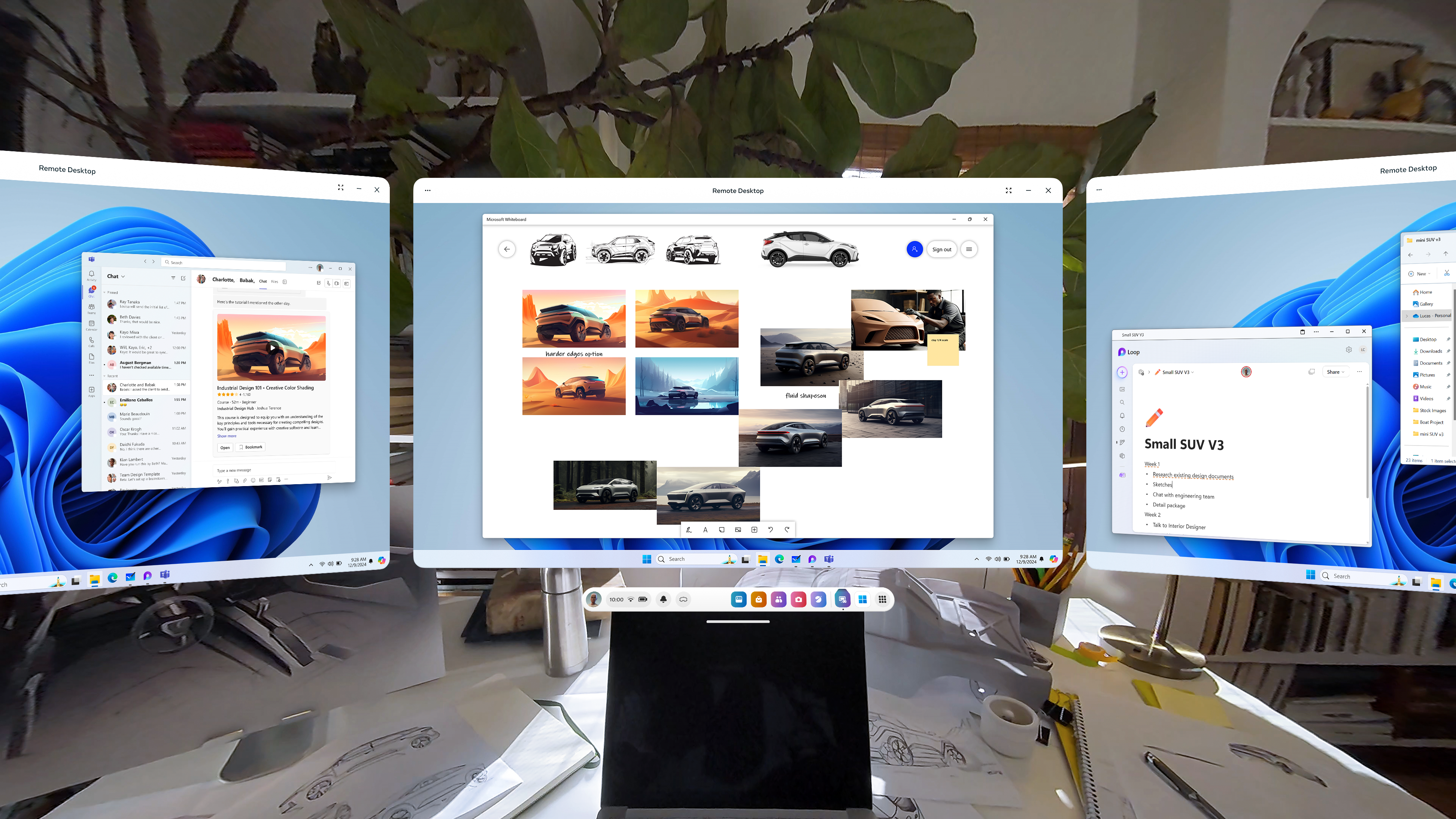
- Remote Desktop in Quick Settings
- ability to use desktop remotely through the Meta Quest Link app on PC
- in-headset pairing of third-party styluses
- in-headset controller pairing
- view app permissions while in use
- higher-quality casting from headset to PC
- new Calendar app, with Google and Outlook Calendars integration, support for subscribed Meta Horizon Worlds events or Workrooms meetings
- ability to share and play back spatial video within Horizon Chat in-headset and mobile
- Volume Mixer, with separate Call Volume and App & Media Volume
- support for content utilizing 3 degrees of freedom (DoF) head tracking through Dolby Atmos and Dolby Digital Surround
- Audio to Expression: machine perception and AI capability deriving facial motion and lip sync signals from microphone input, providing upper face movements including upper cheeks, eyelids, and eyebrows for avatars
- improvements for Passthrough and Space Setup
- v72 [link]
- live captions
- system-wide virtual selfie cam
- app folder for PC VR apps
- launch 2D apps in the room: dragging and dropping the icon into your space
- refreshed boot screen branding (officially “Meta Horizon OS”)
- passthrough keyboard cutout with soft gradient when touching physical keyboard
- dedicated Photo Gallery app
- smart storage
- one more slot for pinned apps
Meta Orion
- Demo of Meta Orion AR glasses at Meta Connect and to tech journalists/vloggers
- I’m especially interested in the neural wristbands. Definitely the biggest step forward by far.
- Unfortunate that this will remain testware for the foreseeable future
Xreal One and One Pro
- Launched early December
- Basically the XReal Air 2 and Air 2 Pro with an embedded co-processor to enable a 3dof spatial UI
- Still needs to be connected to a phone
- Still a pair of movie glasses to be used in stationary settings
- Still no news on the XReal Air 2 Ultra since it was released to developers in the spring
Other items
- Release of Meta Quest 3S, replacing 128GB Quest 3
- Discontinuation of Quest 2 and Quest Pro
- Merger of separate apps for official Quest casting, PC VR, and remote desktop into Meta Quest Link
Takeaway
These last few updates, including what is currently seen in the v72 PTC, have really capped off a significant improvement in what the Quest 3 can do since its initial release in September 2023. Mixed reality on the device has become less of a gimmick. I’m surprised that I can’t find a anniversary review of the Quest 3 comparing the updates between September 2023 and December 2024. Biggest updates:
- Passthrough
- V60: passthrough while loading app (if enabled)
- V64: resolution and image quality
- V65: passthrough environment for some system menus and prompts, including lockscreen and power-off menu
- V66: improvements to passthrough, including reductions in warping
- V67: ability to take any window fullscreen, thus replacing other windows and replacing the dock with simplified control bar with buttons for toggling curving, passthrough background, and brightness of background
- V71: improvements for Passthrough and Space Setup
- V72: generalized passthrough cutout access for physical keyboards
- Boundary and space setup
- V59: suggested boundary and assisted space setup (for Quest 3)
- V60: cloud computing capabilities to store boundaries, requiring opt-in to share point cloud data
- V62: support for up to 15 total saved spaces in Space Setup
- V64: automatic detection and labeling of objects within mesh during Space Setup (undocumented, experimental, optional)
- V65: Local multiplayer and boundary recall with Meta Virtual Positioning System
- V66: Space Setup automatic identification and marking of furniture (windows, doors, tables, couches, storage, screens, and beds, with additional furniture types supported over time) (documented, optional)
- V69: automatic placing of user into a stationary boundary when user visits Horizon Home
- V71: improvements for Passthrough and Space Setup
- V72: automatic stationary boundary when booting into VR home
- Avatars and hands
- V59: legs for avatars in Horizon Home
- V64: simultaneous tracking of hands and Touch Pro/Touch Plus controllers in the same space (undocumented, experimental, optional)
- V65: fewer interruptions from hand tracking when using a physical keyboard or mouse with headset
- V68: ability to pair controller to headset while in-headset
- V71:
- Audio to Expression: machine perception and AI capability deriving facial motion and lip sync signals from microphone input, providing upper face movements including upper cheeks, eyelids, and eyebrows for avatars. Replaces OVRLipsync SDK.
- in-headset pairing of third-party styluses
- in-headset controller pairing
- V72: hand-tracking updates: stabilization and visual fixes for cursor; responsiveness and stability of drag-and-drop interactions
Meta Had a Big Two Weeks with Quest
Meta had an intense two weeks. First:
Quest Update v64 Improves Space Setup and Controllers
Quest Platform OS v64, released April 8, came with two undocumented features:
- Automatic detection and labeling of furniture objects during Space Setup
- Detection and tracking of both hands and Meta brand controllers
It is interesting that this automatic detection and labeling of objects made it into a regular release of the Quest OS firmware:
- Without documentation nor announcement
- Within a month after first appearing in a video of a research paper from Reality Labs
My theory is that someone else at Meta may have seen the SceneScript video and thought that the automatic detection and labeling would be a good feature to try adding separately to Quest OS, but as both an Easter egg as well as an experimental option, and are anticipating user feedback on how well this implementation is performing without making it obvious.
To compare it to SceneScript below:
It is slower and not as complete as the SceneScript videos, but it definitely seems to save time when adding furniture during Scene Setup. This definitely moves the Quest Platform further in the direction of frictionless setup and operation.
In fact, this is such an undocumented feature that it was only found and confirmed by Twitter users and publicized by one YouTuber, The Mysticle, and the AndroidCentral blog at the time of writing. So this is very new.
Also, I don’t know if the Vision Pro has automatic labeling of furniture yet, although it has automatic room scanning with the sheer number of cameras built in.
What may be coming in v65
Currently reading about changes in the code of v65 PTC, some things stand out as possibilities:
- Removal and scaling back of augments, perhaps in favor of pinned app windows
- Flight/Travel Mode for Quest
- Placing the passcode login screen in passthrough.
- “Custom Skybox View” feature using Meta Generative AI integration, including custom sounds.
I guess we’ll find out in early May.
Rebrand and Third-Party Licensing of OS and App Store for Meta Quest

The news from Meta’s April 22 announcement:
- Meta announced that they’re renaming the OS for Quest devices to Horizon OS, as well as the Quest Store to Horizon Store.
- Also: Horizon OS will be licensed to third party OEMs, starting with Asus and Lenovo.
- App Lab will be merged into Horizon Store, App Lab name will be retired, Horizon Store will have more lax threshold for accepting app/game submissions.
- A spatial software framework will be released for mobile app developers to port their apps to Horizon OS.
My thoughts:
- This is the first time that the operating system for Quest 3 and its predecessors has had an actual brand name.
- They’re really wanting to distinguish their software and services stack from their hardware.
- Surprised they didn’t rename the Quest Browser as Horizon Browser. Maybe that will come later?
- This may be the cementing phase of XR headsets as a computing form factor, a maturation from just an expensive magical toy/paperweight to play games with.
- Two drawbacks: more hardware to design the OS for, and probably a slower update cycle than the current monthly.
- We will probably need an FOSS “third thing” as an alternative to both visionOS and Horizon OS.
- XR hardware may flourish and advance by using Horizon OS instead of their own embedded software. Pico, Pimax and HTC a come to mind as potential beneficiaries of this.
- Meta may use this as a launchpad for extending Horizon OS into other form factors, like something that can straddle the gap between XR hardware on one end and the Meta Ray-Ban Glasses on the other end.
- In terms of software feature parity, Meta has been trying to play catch-up with Apple’s Vision Pro since February, and have made it plain that Apple is their real opponent in this market. Google is merely a bothersome boomer at this point.
Other news
VIDEO: Cornell Keeps It Going with/ Sonar + AI: Now for a Hand-tracking Wristband
- Engadget in April 2023: Researchers at Cornell built EchoSpeech, AI-infused sonar glasses that track lip movements for silent communication
- Also Engadget in November 2023: These AI-infused sonar-equipped glasses from (again) Cornell could pave the way for better VR upper-body tracking (paper on PoseSonic)
- March 2024: Cornell paper on GazeTrak, which uses sonar acoustics with AI to track eye movements from glasses.
- Also in March 2024: Cornell paper on EyeEcho, which tracks other facial expressions, expanding on EchoSpeech
Now Cornell’s Lab have come up with yet another development, but not a pair of glasses: EchoWrist, a wristband using sonar + AI for hand-tracking.
(This also tracks from a 2022 (or 2016?) paper about finger-tracking on smartwatches using sonar (paper).)
Based on what I’ve read from this Hackerlist summary as well as Cornell’s press release, this is a smart, accessible, less power-hungry and more privacy-friendly addition to the list of sound+AI-based tools coming out of Cornell for interacting with AR. The only question is how predictive the neural network can be when it comes to the hand gestures being made.
For comparison, Meta’s ongoing neural wristband project, which was acquired along with CTRL Labs in 2022, uses electromyography (EMG) and AI to read muscle movements and nerve sensations through the wrist to not only track hand, finger and arm positioning, but even interpret intended characters when typing on a bare surface.
There shouldn’t be much distance between EchoWrist, EchoSpeech and using acoustics to detect, interpret and anticipate muscle movements in the wrist (via phonomyography). If sonar+AI can also be enhanced to read neural signals and interpret intended typed characters on a bare surface, then sign me up.
EDIT 4/8/23: surprisingly, there is a way to use ultrasound acoustics to record neural activity.
Video of EchoWrist (hand-tracking wristband)
Video of EyeEcho (face-tracking)
Video of GazeTrak (eye-tracking)
Video of PoseSonic (upper-body tracking)
Video of EchoSpeech (mouth-tracking)
Cornell Does It Again: Sonar+AI for eye-tracking
If you remember:
- Engadget in April 2023: Researchers at Cornell built AI-infused sonar glasses that track facial movements for silent communication
- Also Engadget in November 2023: These AI-infused sonar-equipped glasses from (again) Cornell could pave the way for better VR upper-body tracking (paper)
- From Techbriefs 2016: finger-tracking on smartwatches using sonar (paper)
Now, Cornell released another paper on GazeTrak, which uses sonar acoustics with AI to track eye movements.
Our system only needs one speaker and four microphones attached to each side of the glasses. These acoustic sensors capture the formations of the eyeballs and the surrounding areas by emitting encoded inaudible sound towards eyeballs and receiving the reflected signals. These reflected signals are further processed to calculate the echo profiles, which are fed to a customized deep learning pipeline to continuously infer the gaze position. In a user study with 20 participants, GazeTrak achieves an accuracy of 3.6° within the same remounting session and 4.9° across different sessions with a refreshing rate of 83.3 Hz and a power signature of 287.9 mW.
Major drawback, however, as summarized by Mixed News:
Because the shape of the eyeball differs from person to person, the AI model used by GazeTrak has to be trained separately for each user. To commercialize the eye-tracking sonar, enough data would have to be collected to create a universal model.
But still though, Cornell has now come out with research touting sonar+AI as a replacement for camera sensors (visible and infrared) for body, face and now eye tracking. This increases the possibilities of VR and AR which is smaller in size, more efficient in energy and more responsive to privacy. I’m excited for this work.
Video of GazeTrak (eye-tracking)
Video of PoseSonic (upper-body tracking)
Video of EchoSpeech (face-tracking)
Thoughts on the Vision Pro, VisionOS and AR/VR
These are my collected thoughts about the Vision Pro, visionOS and at least some of the future of mobile AR as a medium, written in no particular order. I’ve been very interested in this device, how it is being handled by the news media, and how it is broadening and heightening our expectations about augmented reality as those who can afford it apply it in “fringe” venues (i.e., driving, riding a subway, skiing, cooking). I also have thoughts about whether we really need that many optical lenses/sensors, how Maps software could be used in mobile smartglasses AR, and what VRChat-like software could look like in AR. This is disjointed because I’m not having the best time in my life right now.
Initial thoughts
These were mostly written around February 1.
- The option to use your eyes + pinch gesture to select keys on the virtual keyboard is an interesting way to type out words.
- But I’ve realized that this should lead, hopefully, to a VR equivalent of swipe-typing on iOS and Android: holding your pinch while you swipe your eyes quickly between the keys before letting go, and letting the software determine what you were trying to type. This can give your eyes even more of a workout than they’re already getting, but it may cut down the time in typing.
- I also imagine that the mouth tracking in visionOS could allow for the possibility of reading your lips for words without having to “listen”, so long as you are looking at a microphone icon. Or maybe that may require tongue tracking, which is a bit more precise.
- The choice to have menus pop up to the foreground in front of a window is also distinctive from the QuestOS.
- The World Wide Web in VR can look far better. This opens an opportunity for reimagining what Web content can look like beyond the WIMP paradigm, because the small text of a web page in desktop view may not cut it.
- At the very least, a “10-foot interface” for browsing the web in VR should be possible and optional.
- The weight distribution issue will be interesting to watch unfold as the devices go out to consumers. 360 Rumors sees Apple’s deliberate choice to load the weight on the front as a fatal flaw that the company is too proud to resolve. Might be a business opportunity for third party accessories, however.
Potential future gestures and features
Written February 23.
The Vision Pro’s gestures show an increase in options for computing input beyond pointing a joystick:
- Eye-tracked gaze to hover over a button
- Single quick Pinch to trigger a button
- Multiple quick pinches while hovering over keys in order to type on a virtual keyboard
- Dwell
- Sound actions
- Voice control
There are even more possible options for visionOS 2.0 both within and likely outside the scope of the Vision Pro’s hardware:
- My ideas
- Swiping eye-tracking between keys on a keyboard while holding a pinch in order to quickly type
- Swiping a finger across the other hand while gazing at a video in order to control playback
- Scrolling a thumb over a finger in order to scroll up or down a page or through a gallery
- Optional Animoji, Memoji and filters in visionOS Facetime for personas
- Silent voice commands via face and tongue tracking
- Other ideas (sourced from this concept, these comments, this video)
- Changing icon layout on home screen
- Placing app icons in home screen folders
- Ipad apps in Home View
- Notifications in Home View sidebar
- Gaze at iphone, ipad, Apple Watch, Apple TV and HomePod to unlock and receive notifications
- Dock for recently closed apps
- Quick access to control panel
- Look at hands for Spotlight or Control Center
- Enable dark mode for ipad apps
- Resize ipad app windows to create desired workspace
- Break reminders, reminders to put the headset back on
- Swappable shortcuts for Action button
- User Profiles
- Unlock and interact with HomeKit devices
- Optional persistent Siri in space
- Multiple switchable headset environments
- Casting to iphone/ipad/Apple TV via AirPlay
- (realtime) Translate
- Face detection
- Spatial Find My
- QR code support
- Apple Pencil support
- Handwritten notes detection
- Widget support
- 3D (360) Apple maps
- 3D support
- Support for iOS/ipadOS keyboard
VRChat in AR?
Written February 23.
- What will be to augmented reality what VRChat is to VR headsets and Second Life to desktops?
- Second Life has never been supported by Linden Labs on VR headsets
- No news or interest from VRChat about a mixed reality mode
- (Color) Mixed reality is a very early, very open space
- The software has yet to catch up
- The methods of AR user input are being fleshed out
- The user inputs for smartphones and VR headsets have largely settled
- Very likely that AR headset user input will involve more reading of human gestures, less use of controllers
- But what could an answer to VRChat or Second Life look like in visionOS or even Quest 3?
- Issues
- VRChat (VR headset) and Second Life (desktop) are about full-immersion social interaction in virtual reality
- Facetime-like video chat with face-scanned users in panels is the current extent
- Hardware weight, cost, size all limit further social avatars
- Device can’t be used outside of stationary settings as per warranty and company policy
- Lots of limitations to VRChat-like applications which involve engagement with meatspace
- Issues
- What about VRChat-like app in full-AR smartglasses?
- Meeting fellow wearers IRL who append filters to themselves which are visible to others
- Geographic AR layers for landmarks
- 3D AR guided navigation for maps
- Casting full personal view to other stationary headset/smartglass users
- Having other users’ avatars visit you at a location and view the location remotely but semi-autonomously
- Requires additional hardware. 360-degree cameras
- The “Televerse” concepts from the Computational Media Innovation Centre in New Zealand are definitely pointing in this direction.
Google Maps Immersive View
Written back on December 23.
Over a year and a half ago, Google announced Immersive View, a feature of Google Maps which would use AI tools like predictive modeling and NeRF fields to generate 3D images from Street View and aerial images of both exteriors and interiors of locations, as well as generate information and animations about locations from historical and environmental data for forecasts like weather and traffic. Earlier this year, they announced an expansion of Immersive View to routes (by car, bike or walk).
This, IMO, is one of Google’s more worthwhile deployments of AI: applying it to mashup data from other Google Maps features, as well as the library of content built by Google and third-party users of Google Maps, to create more immersive features.
I just wonder when they will apply Immersive View to Google Earth.
Granted, Google Earth already has had 3D models of buildings for a long time, initially with user-generated models in 2009 which were then replaced with autogenerated photogrammetric models starting in 2012. By 2016, 3D models had been generated in Google Earth for locations, including their interiors, in 40 countries, including locations in every U.S. state. So it does seem that Immersive View brings the same types of photogrammetric 3D models of select locations to Google Maps.
The differences between Immersive View and Google Earth seem to be the following:
- animations of moving cars simulating traffic
- predictive forecasts of weather, traffic and busyness outward to a month ahead, with accompanying animation, for locations
- all of the above for plotted routes as well
But I think there is a good use case for the idea of Immersive View in Google Earth. Google touts Immersive View in Maps as “getting the vibe” of a location or route before one takes it. Google Earth, which shares access to Street View with Google Maps, is one of a number of “virtual globe” apps made to give cursory, birds-eye views of the globe (and other planetary bodies). But given the use of feature-rich virtual globe apps in VR headsets like Meta Quest 3 (see: Wooorld VR, AnyWR VR, which both have access to Google Earth and Street View’s data), I am pretty sure that there is a niche overlap of users who want to “slow-view” Street View locations and routes for virtual tourism purposes without leaving their house, especially using a VR headset.
But an “Immersive View” for Google Earth and associated third-party apps may have go in a different direction than Immersive View in Maps.
The AI-driven Immersive View can easily fit into Google Earth as a tool, smoothing over more of the limitations of virtual globes as a virtual tourism and adding more interactivity to Street View.
Sonar+AI in AR/VR?
Written around February 17.
- Engadget: Researchers at Cornell built AI-infused sonar glasses that track facial movements for silent communication
- Also Engadget: These AI-infused sonar-equipped glasses from (again) Cornell could pave the way for better VR upper-body tracking (paper)
- From Techbriefs 2016: finger-tracking on smartwatches using sonar (paper)
Now if someone can try hand-tracking, or maybe even eye-tracking, using sonar. The Vision Pro’s 12 cameras (out of 23 total sensors) need at least some replacement with smaller analogues:
- Two main cameras for video and photo
- Four downward, 2 TrueDepth and 2 sideways world-facing tracking cameras for detecting your environment in stereoscopic 3D
- four Infrared internal tracking cameras that track every movement your eyes make, as well as an undetermined number of infrared cameras outside to see despite lighting conditions
- LiDAR
- Ambient light sensor
- 2 infrared illuminators
- Accelerometer & Gyroscope
Out of these, perhaps the stereoscopic cameras are the best candidates for replacement with sonar components.
I can see hand-tracking, body-tracking and playspace boundary tracking being made possible with the Sonar+AI combination.
Links of interest 2/26/24
- Good news:
- Computing tech:
- Zoom will have additional features for their VisionOS version: usage of visionOS personas based on face scans, pinning faces of meeting participants with transparent backgrounds in the real-world environment, and 3D object file-sharing.
- Meta Quest 3 to support iOS/visionOS Spatial Video.
- Interview with Metalenz
- Reports: Meta Quest Pro 2 set to ship in early 2025 with LG as hardware partner. Hopefully going to build on top of lessons from both Quest 3, original Quest Pro and Apple Vision Pro.
- Reports: Apple considering competitor to Meta Ray-Ban, other AI glasses. Apple also looking at options for augmenting other devices, including cameras in AirPods.
- Vision Pro release party in San Francisco, complete with multiple people wearing VP headsets while partying (more on the organizers)
- Disney Research invents HoloTile, a multi-user omnidirectional treadmill.
- Feds to Insurer: AI cannot be used to deny health care coverage.
- IFTAS takes action against deadnaming and misgendering in the fediverse.
- ideas on visionOS 2.0 features (sourced from this concept, these comments, this video)
- Engadget: Researchers at Cornell built AI-infused sonar glasses that track facial movements for silent communication. Also Engadget: These AI-infused sonar-equipped glasses from (again) Cornell could pave the way for better VR upper-body tracking (paper)
- Civil rights and elections
- Japan’s Wakayama Prefecture to become the 21st to create a same-sex partnership registry on 1 February (news in Japanese). More prefectures to create similar registries throughout the year, but no news as to more mutual recognition agreements between prefectures as of yet. Keep track on Wikipedia.
- PA Supreme Court rules that the state’s Equal Rights Amendment protects Medicaid coverage of abortion procedures.
- Governor Tony Evers signs last-ditch legislative district maps from the Republican-supermajority legislature who want to avoid a WI Supreme Court unilateral redraw. New maps, which are very evenly divided, take effect for the November 2024 elections for all Assembly seats and half of Senate seats. Evers is seeking judicial override of a portion of the new law prohibiting use of the new maps for an earlier special election. Big Republican concession nonetheless, a decade and some change in the making.
- Sightline Institute on even-year local elections.
- Same-sex marriage now legal in Greece. The Wild Hunt reviews reactions from local polytheists.
- Polish public TV reporter apologizes on air for carrying homophobic, transphobic water for the former PiS government.
- Reconciliation within the Alabama Democratic Party?
- Florida Officials Confirm Abortion Legalization Ballot Measure Qualifies for the Ballot Pending FL Supreme Court Decision
- How indigenous leaders saved Guatemalan democracy
- Alabama union membership increases for 2nd year
- Weed legalization passed in German Parliament
- POTUS’ Plan B on student loan debt forgiveness and its success
- Climate, housing and infrastructure
- Decatur declared “most bikeable city in Georgia” by Redfin. Still a long ways from Portland OR though.
- Researchers achieve breakthrough in solar technology: system can capture and store solar energy for up to 18 years and can produce electricity when connected to a thermoelectric generator (EuroNews Green, paper)
- SPUR Urban Center publishes white paper recommending the creation of a California Housing Agency and California Planning Agency (PDF).
- Spain’s cabinet supports bill to ban domestic flights which can be replaced with a high speed rail ride.
- Australia’s cars emit more cumulative CO2 than elsewhere. Pressure on the Albanese government to make voluntary emission standards mandatory.
- How Los Angeles is becoming a sponge city and overcoming the ongoing atmospheric river.
- Professor Michael Mann wins big in court against climate denialists in defamation case.
- Streetsblog USA: Why Jaywalking Reform is an Unhoused Rights Issue.
- Half of 2022 bike rides in US were for social or recreational use.
- Amsterdam is the first European city to endorse the Plant-Based Treaty.
- Superfund for Climate Change?
- Nanowerk: sound-powered sensors could save millions of batteries.
- Strong Towns on how Sacramento City Council ended single-family zoning in city limits by increasing the Floor Area Ratio and switching to a form-based zoning code. This is on top of laws passed by the state to override city laws to abolish parking minimums within a 1/2 mile of transit and allowing for homeowners to split their home lots into ADUs.
- Washington State House passes lot splitting bill.
- Researchers find way to use AI to slash energy use of carbon capture.
- States are preparing to use Medicaid for rental assistance for the first time.
- Climate concerns shifting some voting preferences/patterns
- Health
- Computing tech:
- Bad news:
- Study (PDF): African Americans freed from slavery in slave states after the Civil War had worse, multi-generational economic outcomes afterward than those freed from slavery in free states prior to Civil War, and Jim Crow added compound economic interest. Makes sense.
- From Erin Reed: A full-on assault on bodily autonomy for anyone is plotted by religious bioconservative legislators, including against abortion and gender confirmation treatment.
- Study: We blew past 1.5C degree of warming 4 years ago. Yikes.
- Power companies paid civil rights activists in the South. Sad, frustrating.
- Spam attack wave hits the Fediverse, erupting from a stupid feud in the Japanese-language Web. Investigations from Cappy at Fyra Labs, Techcrunch (and another article on how Discord failed to take any action against the perps)
- Big trouble for electrified transport in Germany.
- CNBC tries to explain why these tech layoffs keep happening
- Ohio families seek funds to flee Ohio after veto override on transphobic legislation
- NYC Marathon refuses to give nonbinary prize money to winner. Rule: “a runner eligible for prize money in the nonbinary group had to be a member of the NYRR for at least six months, and compete in several club-sponsored events. The same rule applies to professional and invited athletes.” Winner: “They added this stipulation to this division following the registration period. It was not there last year.”
- Somber news:
- Sonar detection found an object which may be Amelia Earhart’s plane somewhere near Howard Island in the Pacific. It took years and millions of dollars, and will take even more to lead an expedition to confirm.
- The mass murders of Jews and Romani people by Nazis and their collaborators were deeply interlinked.
- Study: Transphobia hurts trans women’s health.
- How the word “voodoo” became a racial slur.
- How America failed to defend liberal values abroad.
- LGBT rights groups bring complaints against Texas to UN
- Air pollution linked to dementia
- The Non-Emergent Democratic Majority?
- Interesting
- BlueSky opens up their AT protocol, shining a light on the ongoing beef that many Fediverse users have with BlueSky and their protocol.
- Mozilla walks away from Hubs and Fediverse projects, tries to chase AI and profit. At least they’ve open-sourced both.
- Toward a unified taxonomy of text-based social media use.
- The New Republic: Quit Hating on California
- How conservatives are finally admitting they hate MLK
- Abolish the $100 bill
- Time for Democrats to Make Some Enemies. Cue Drake.
- Wikipedia links:
- Role of mothers in Disney media
- Slate voting
Thoughts on Threads:
- From what I’ve read, there’s not much to it yet.
- If you have a Mastodon account, you don’t need to sign up for Threads. You will be able to directly interact with Threads posts and users soon enough.
- when they flip the switch on joining the Fediverse, it can become an “Eternal September” type of situation for other Fediverse servers, like when AOL joined millions of people to the Usenet network in 1993.
- Meta will have to learn how to segregate their advertising and data retention interests away from other Fediverse servers. Numerous Fediverse servers have preemptively defederated from Threads in advance out of fears over these interests.
- Meta will also have to learn how to play nice with other Fediverse servers when it comes to data migration between servers. Otherwise they can find themselves locked out through defederation.
- If you wanted the idea of “microblogging social media as a public, distributed utility like email” to go mainstream, something like Threads may be the first well-funded foray into that idea. No turning back now.
- If you wanted to no longer have to be locked out from your friends and content because the social media app du jour doesn’t work well anymore/doesn’t play nice with other apps, watch this space.
SciTech Links I’ve Read Over the Last 3 Months
- Piperika is perhaps the first site which allows one to track one’s reading progress on webcomics. Highly recommended.
- Good to see that Metalenz is making an impact.
- Medium launches their own Mastodon instance at me.dm. Waiting for when Tumblr and Mozilla make their own moves into the Fediverse.
- Proposal for “Conservation districts” in Houston
- Framasoft acknowledges the historic abuse of PeerTube by the far-right.
- Microsoft has its first labor union in the U.S.
- First county on the U.S. East Coast to ban natural gas
- We need a plastics treaty
- U.S. and E.U. to launch AI agreement
- Sponge cities and how the trend must spread
- The “State of Carbon Dioxide Removal” report
- E-Bikes and Bike Libraries
- Generative AI: Auto-complete for everything
- We’re not ready for this century of biotech innovation
- The Climate Economy’s Future
- Protected Forests are Cooler
- Lab-grown meat moves closer to use in U.S. restaurants
