Tag Archives: virtual reality

VR + AR Tabs December 2024

Catching up on what has happened in VR/AR since the summer:

  • v68
    • Meta Quest mobile app renamed as Meta Horizon app
    • Light mode added to Horizon mobile app
    • ability to start or join audio calls between the mobile app and Meta Quest headsets
    • Integration of Meta AI with Vision on Quest 3 and Meta AI audio-only on Quest 2 (experimental); replaces older on-device voice assistant (set for August 2024 release)
    • reduced performance latency on Quest 3
    • support for Content Adaptive Brightness Control in Quest 3 (experimental)
    • account management and communication updates in Safety Center
    • updates for the virtual keyboard
    • new Layout app for aligning and measuring real-world objects in physical space
    • new Download and All tabs in Library
    • management of cloud backups
    • ability to pair controller to headset while in-headset
    • audio alert for low battery
    • ability control the audio level balance between microphone and game audio when recording, live streaming, or casting
    • increased screenshot resolution in Quest 3 from 1440×1440 to 2160×2160
  • v69
    • “Hey Meta” wake word for Meta AI
    • v67 New Window Layout moved to default
    • spatial audio from windows
    • ability to completely remove unwanted apps and worlds, including leftover apps already uninstalled
    • quick pairing of Bluetooth peripherals when they are in pairing mode and near the headset
    • ability to keep the universal menu and up to three windows open during immersive experiences
    • Content-adaptive backlight control
    • automatic placing of user into a stationary boundary when user visits Horizon Home
    • Head tracked cursor interaction improvements for staying hidden when not wanted
    • ability to view the last 7 days of sensitive permission access by installed apps
    • Unified control of privacy across Meta Quest and Horizon Worlds
    • Control visibility and status from the social tab
    • support for tracked styluses
    • Oceanarium environment for Horizon Home
    • v69 required to support Horizon Worlds, Horizon Workrooms, co-presence and other Meta Horizon social experiences
  • v71 (v70 skipped by Meta)
    • redesign of Dark and Light Themes
    • redesign of control bar location
    • redesign of Settings menu
    • Travel Mode extended to trains
    • Link feature enabled by default
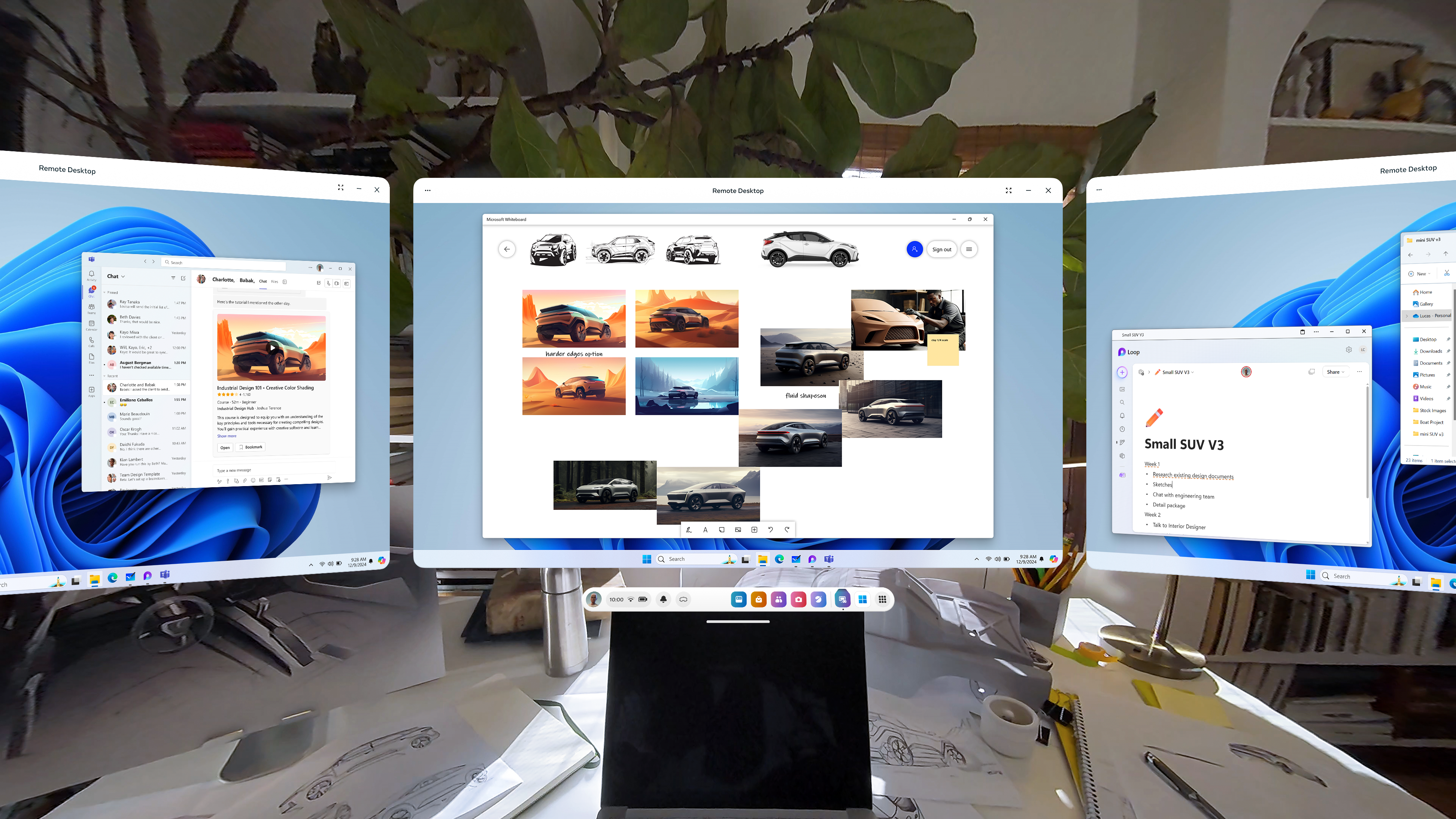
    • Remote Desktop in Quick Settings
    • ability to use desktop remotely through the Meta Quest Link app on PC
    • in-headset pairing of third-party styluses
    • in-headset controller pairing
    • view app permissions while in use
    • higher-quality casting from headset to PC
    • new Calendar app, with Google and Outlook Calendars integration, support for subscribed Meta Horizon Worlds events or Workrooms meetings
    • ability to share and play back spatial video within Horizon Chat in-headset and mobile
    • Volume Mixer, with separate Call Volume and App & Media Volume
    • support for content utilizing 3 degrees of freedom (DoF) head tracking through Dolby Atmos and Dolby Digital Surround
    • Audio to Expression: machine perception and AI capability deriving facial motion and lip sync signals from microphone input, providing upper face movements including upper cheeks, eyelids, and eyebrows for avatars
    • improvements for Passthrough and Space Setup
  • v72 [link]
    • live captions
    • system-wide virtual selfie cam
    • app folder for PC VR apps
    • launch 2D apps in the room: dragging and dropping the icon into your space
    • refreshed boot screen branding (officially “Meta Horizon OS”)
    • passthrough keyboard cutout with soft gradient when touching physical keyboard
    • dedicated Photo Gallery app
    • smart storage
    • one more slot for pinned apps

Meta Orion

  • Demo of Meta Orion AR glasses at Meta Connect and to tech journalists/vloggers
  • I’m especially interested in the neural wristbands. Definitely the biggest step forward by far.
  • Unfortunate that this will remain testware for the foreseeable future

Xreal One and One Pro

  • Launched early December
  • Basically the XReal Air 2 and Air 2 Pro with an embedded co-processor to enable a 3dof spatial UI
  • Still needs to be connected to a phone
  • Still a pair of movie glasses to be used in stationary settings
  • Still no news on the XReal Air 2 Ultra since it was released to developers in the spring

Other items

  • Release of Meta Quest 3S, replacing 128GB Quest 3
  • Discontinuation of Quest 2 and Quest Pro
  • Merger of separate apps for official Quest casting, PC VR, and remote desktop into Meta Quest Link

Takeaway

These last few updates, including what is currently seen in the v72 PTC, have really capped off a significant improvement in what the Quest 3 can do since its initial release in September 2023. Mixed reality on the device has become less of a gimmick. I’m surprised that I can’t find a anniversary review of the Quest 3 comparing the updates between September 2023 and December 2024. Biggest updates:

  • Passthrough
    • V60: passthrough while loading app (if enabled)
    • V64: resolution and image quality
    • V65: passthrough environment for some system menus and prompts, including lockscreen and power-off menu
    • V66: improvements to passthrough, including reductions in warping
    • V67: ability to take any window fullscreen, thus replacing other windows and replacing the dock with simplified control bar with buttons for toggling curving, passthrough background, and brightness of background
    • V71: improvements for Passthrough and Space Setup
    • V72: generalized passthrough cutout access for physical keyboards
  • Boundary and space setup
    • V59: suggested boundary and assisted space setup (for Quest 3)
    • V60: cloud computing capabilities to store boundaries, requiring opt-in to share point cloud data
    • V62: support for up to 15 total saved spaces in Space Setup
    • V64: automatic detection and labeling of objects within mesh during Space Setup (undocumented, experimental, optional)
    • V65: Local multiplayer and boundary recall with Meta Virtual Positioning System
    • V66: Space Setup automatic identification and marking of furniture (windows, doors, tables, couches, storage, screens, and beds, with additional furniture types supported over time) (documented, optional)
    • V69: automatic placing of user into a stationary boundary when user visits Horizon Home
    • V71: improvements for Passthrough and Space Setup
    • V72: automatic stationary boundary when booting into VR home
  • Avatars and hands
    • V59: legs for avatars in Horizon Home
    • V64: simultaneous tracking of hands and Touch Pro/Touch Plus controllers in the same space (undocumented, experimental, optional)
    • V65: fewer interruptions from hand tracking when using a physical keyboard or mouse with headset
    • V68: ability to pair controller to headset while in-headset
    • V71:
      • Audio to Expression: machine perception and AI capability deriving facial motion and lip sync signals from microphone input, providing upper face movements including upper cheeks, eyelids, and eyebrows for avatars. Replaces OVRLipsync SDK.
      • in-headset pairing of third-party styluses
      • in-headset controller pairing
    • V72: hand-tracking updates: stabilization and visual fixes for cursor; responsiveness and stability of drag-and-drop interactions

Cornell Does It Again: Sonar+AI for eye-tracking

If you remember:

Now, Cornell released another paper on GazeTrak, which uses sonar acoustics with AI to track eye movements.

Our system only needs one speaker and four microphones attached to each side of the glasses. These acoustic sensors capture the formations of the eyeballs and the surrounding areas by emitting encoded inaudible sound towards eyeballs and receiving the reflected signals. These reflected signals are further processed to calculate the echo profiles, which are fed to a customized deep learning pipeline to continuously infer the gaze position. In a user study with 20 participants, GazeTrak achieves an accuracy of 3.6° within the same remounting session and 4.9° across different sessions with a refreshing rate of 83.3 Hz and a power signature of 287.9 mW.

Major drawback, however, as summarized by Mixed News:

Because the shape of the eyeball differs from person to person, the AI model used by GazeTrak has to be trained separately for each user. To commercialize the eye-tracking sonar, enough data would have to be collected to create a universal model.

But still though, Cornell has now come out with research touting sonar+AI as a replacement for camera sensors (visible and infrared) for body, face and now eye tracking. This increases the possibilities of VR and AR which is smaller in size, more efficient in energy and more responsive to privacy. I’m excited for this work.

Video of GazeTrak (eye-tracking)

Video of PoseSonic (upper-body tracking)

Video of EchoSpeech (face-tracking)

Thoughts on the Vision Pro, VisionOS and AR/VR

These are my collected thoughts about the Vision Pro, visionOS and at least some of the future of mobile AR as a medium, written in no particular order. I’ve been very interested in this device, how it is being handled by the news media, and how it is broadening and heightening our expectations about augmented reality as those who can afford it apply it in “fringe” venues (i.e., driving, riding a subway, skiing, cooking). I also have thoughts about whether we really need that many optical lenses/sensors, how Maps software could be used in mobile smartglasses AR, and what VRChat-like software could look like in AR. This is disjointed because I’m not having the best time in my life right now.

Initial thoughts

These were mostly written around February 1.

  • The option to use your eyes + pinch gesture to select keys on the virtual keyboard is an interesting way to type out words.
    • But I’ve realized that this should lead, hopefully, to a VR equivalent of swipe-typing on iOS and Android: holding your pinch while you swipe your eyes quickly between the keys before letting go, and letting the software determine what you were trying to type. This can give your eyes even more of a workout than they’re already getting, but it may cut down the time in typing.
    • I also imagine that the mouth tracking in visionOS could allow for the possibility of reading your lips for words without having to “listen”, so long as you are looking at a microphone icon. Or maybe that may require tongue tracking, which is a bit more precise.
  • The choice to have menus pop up to the foreground in front of a window is also distinctive from the QuestOS.
  • The World Wide Web in VR can look far better. This opens an opportunity for reimagining what Web content can look like beyond the WIMP paradigm, because the small text of a web page in desktop view may not cut it.
    • At the very least, a “10-foot interface” for browsing the web in VR should be possible and optional.
  • The weight distribution issue will be interesting to watch unfold as the devices go out to consumers. 360 Rumors sees Apple’s deliberate choice to load the weight on the front as a fatal flaw that the company is too proud to resolve. Might be a business opportunity for third party accessories, however.

Potential future gestures and features

Written February 23.

The Vision Pro’s gestures show an increase in options for computing input beyond pointing a joystick:

  • Eye-tracked gaze to hover over a button
  • Single quick Pinch to trigger a button
  • Multiple quick pinches while hovering over keys in order to type on a virtual keyboard
  • Dwell
  • Sound actions
  • Voice control

There are even more possible options for visionOS 2.0 both within and likely outside the scope of the Vision Pro’s hardware:

  • My ideas
    • Swiping eye-tracking between keys on a keyboard while holding a pinch in order to quickly type
    • Swiping a finger across the other hand while gazing at a video in order to control playback
    • Scrolling a thumb over a finger in order to scroll up or down a page or through a gallery
    • Optional Animoji, Memoji and filters in visionOS Facetime for personas
    • Silent voice commands via face and tongue tracking
  • Other ideas (sourced from this concept, these comments, this video)
    • Changing icon layout on home screen
    • Placing app icons in home screen folders
    • Ipad apps in Home View
    • Notifications in Home View sidebar
    • Gaze at iphone, ipad, Apple Watch, Apple TV and HomePod to unlock and receive notifications
    • Dock for recently closed apps
    • Quick access to control panel
    • Look at hands for Spotlight or Control Center
    • Enable dark mode for ipad apps
    • Resize ipad app windows to create desired workspace
    • Break reminders, reminders to put the headset back on
    • Swappable shortcuts for Action button 
    • User Profiles
    • Unlock and interact with HomeKit devices
    • Optional persistent Siri in space
    • Multiple switchable headset environments 
    • Casting to iphone/ipad/Apple TV via AirPlay
    • (realtime) Translate
    • Face detection
    • Spatial Find My
    • QR code support
    • Apple Pencil support
    • Handwritten notes detection
    • Widget support
    • 3D (360) Apple maps 
    • 3D support
    • Support for iOS/ipadOS keyboard

VRChat in AR?

Written February 23.

  • What will be to augmented reality what VRChat is to VR headsets and Second Life to desktops?
    • Second Life has never been supported by Linden Labs on VR headsets
    • No news or interest from VRChat about a mixed reality mode
    • (Color) Mixed reality is a very early, very open space
    • The software has yet to catch up
    • The methods of AR user input are being fleshed out
    • The user inputs for smartphones and VR headsets have largely settled
    • Very likely that AR headset user input will involve more reading of human gestures, less use of controllers
  • But what could an answer to VRChat or Second Life look like in visionOS or even Quest 3?
    • Issues
      • VRChat (VR headset) and Second Life (desktop) are about full-immersion social interaction in virtual reality
      • Facetime-like video chat with face-scanned users in panels is the current extent
      • Hardware weight, cost, size all limit further social avatars
      • Device can’t be used outside of stationary settings as per warranty and company policy
      • Lots of limitations to VRChat-like applications which involve engagement with meatspace
  • What about VRChat-like app in full-AR smartglasses?
    • Meeting fellow wearers IRL who append filters to themselves which are visible to others
    • Geographic AR layers for landmarks
    • 3D AR guided navigation for maps
    • Casting full personal view to other stationary headset/smartglass users
    • Having other users’ avatars visit you at a location and view the location remotely but semi-autonomously

Google Maps Immersive View

Written back on December 23.

Over a year and a half ago, Google announced Immersive View, a feature of Google Maps which would use AI tools like predictive modeling and NeRF fields to generate 3D images from Street View and aerial images of both exteriors and interiors of locations, as well as generate information and animations about locations from historical and environmental data for forecasts like weather and traffic. Earlier this year, they announced an expansion of Immersive View to routes (by car, bike or walk).

This, IMO, is one of Google’s more worthwhile deployments of AI: applying it to mashup data from other Google Maps features, as well as the library of content built by Google and third-party users of Google Maps, to create more immersive features.

I just wonder when they will apply Immersive View to Google Earth.

Granted, Google Earth already has had 3D models of buildings for a long time, initially with user-generated models in 2009 which were then replaced with autogenerated photogrammetric models starting in 2012. By 2016, 3D models had been generated in Google Earth for locations, including their interiors, in 40 countries, including locations in every U.S. state. So it does seem that Immersive View brings the same types of photogrammetric 3D models of select locations to Google Maps.

The differences between Immersive View and Google Earth seem to be the following:

  • animations of moving cars simulating traffic
  • predictive forecasts of weather, traffic and busyness outward to a month ahead, with accompanying animation, for locations
  • all of the above for plotted routes as well

But I think there is a good use case for the idea of Immersive View in Google Earth. Google touts Immersive View in Maps as “getting the vibe” of a location or route before one takes it. Google Earth, which shares access to Street View with Google Maps, is one of a number of “virtual globe” apps made to give cursory, birds-eye views of the globe (and other planetary bodies). But given the use of feature-rich virtual globe apps in VR headsets like Meta Quest 3 (see: Wooorld VR, AnyWR VR, which both have access to Google Earth and Street View’s data), I am pretty sure that there is a niche overlap of users who want to “slow-view” Street View locations and routes for virtual tourism purposes without leaving their house, especially using a VR headset.

But an “Immersive View” for Google Earth and associated third-party apps may have go in a different direction than Immersive View in Maps.

The AI-driven Immersive View can easily fit into Google Earth as a tool, smoothing over more of the limitations of virtual globes as a virtual tourism and adding more interactivity to Street View.

Sonar+AI in AR/VR?

Written around February 17.

Now if someone can try hand-tracking, or maybe even eye-tracking, using sonar. The Vision Pro’s 12 cameras (out of 23 total sensors) need at least some replacement with smaller analogues:

  • Two main cameras for video and photo
  • Four downward, 2 TrueDepth and 2 sideways world-facing tracking cameras for detecting your environment in stereoscopic 3D
  • four Infrared internal tracking cameras that track every movement your eyes make, as well as an undetermined number of infrared cameras outside to see despite lighting conditions
  • LiDAR
  • Ambient light sensor
  • 2 infrared illuminators
  • Accelerometer & Gyroscope

Out of these, perhaps the stereoscopic cameras are the best candidates for replacement with sonar components.

I can see hand-tracking, body-tracking and playspace boundary tracking being made possible with the Sonar+AI combination.

Privatization of the family: a furry example

Among many libertarians and a few progressivists, the concept of marriage privatization – where the state does not involve itself in the definition of marriage – has gained increasing worth as the debate over LGBT rights continues to intensify in the United States. Of course, a main fear over the concept is the possibility that religious groups could run amok with their own definitions and performances of family relationships which would clash with other religious groups’ definitions and performances, particularly as those who advocate for marriage privatization have not as forcefully argued for a secularization of the institution (in which religious groups’ performances are not recognized by the state, which only recognizes privately-composed contracts).

More on furries, marriage privatization, and the Internet…

Sentience + ARToolKit = AR done right

sentience is a software library that allows for robotic stereo vision using stereo webcams (like Minoru 3D, which is of British origin despite its Japanese name), and is written in C#. Meanwhile, ARToolKit is one of the most widely-employed augmented reality software frameworks (and is also, like sentience, FOSS). 

Continue reading Sentience + ARToolKit = AR done right